Clipping to a Path
Clipping to a Path
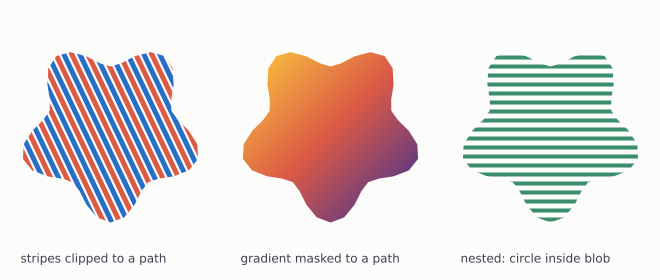
Restrict drawing to an arbitrary path.
Usage
from std.math import cos, pi, sin

from canvas.buffer import Canvas
from canvas.color import Color
from canvas.gradient import LinearGradient
from canvas.io.png import write_png
from canvas.path import Path
from canvas.shapes.lines import draw_line_aa
from canvas.shapes.rects import fill_rect_gradient
from canvas.text.font_cache import FontCache
from canvas.text.render import draw_text

comptime W = 660
comptime H = 280
comptime PANEL = 220


def _blob(cx: Float64, cy: Float64, r: Float64) raises -> Path:
    """A closed wobbly shape, not a circle, so the clip boundary is
    somewhere `push_clip`'s rectangle could never reach.
    """
    var p = Path()
    var lobes = 5
    for i in range(41):
        var t = Float64(i) / 40.0 * 2.0 * pi
        var radius = r * (1.0 + 0.18 * sin(Float64(lobes) * t))
        var x = cx + radius * cos(t)
        var y = cy + radius * sin(t)
        if i == 0:
            p.move_to(x, y)
        else:
            p.line_to(x, y)
    p.close()
    return p^


def main() raises:
    var c = Canvas(W, H, Color(252, 252, 250))
    var cache = FontCache()

    # --- panel 1: stripes clipped to the blob -------------------------
    var blob1 = _blob(110.0, 130.0, 78.0)
    c.push_clip_path(blob1)
    var stripe = 0
    while stripe < 300:
        draw_line_aa(
            c,
            Float64(stripe) - 60.0,
            30.0,
            Float64(stripe) + 40.0,
            240.0,
            Color(40, 110, 200) if stripe % 16 == 0 else Color(220, 90, 70),
            width=5.0,
        )
        stripe += 8
    c.pop_clip_path()

    # --- panel 2: a gradient masked into the same shape ---------------
    var blob2 = _blob(330.0, 130.0, 78.0)
    c.push_clip_path(blob2)
    var grad = LinearGradient(250.0, 50.0, 410.0, 210.0)
    grad.add_stop(0.0, Color(250, 200, 60))
    grad.add_stop(0.5, Color(220, 90, 70))
    grad.add_stop(1.0, Color(70, 50, 140))
    fill_rect_gradient(c, PANEL, 0, PANEL, H, grad)
    c.pop_clip_path()

    # --- panel 3: nested clips ----------------------------------------
    # The circle extends past the blob on every side; the intersection
    # is all that draws, which is the nesting rule.
    var blob3 = _blob(550.0, 130.0, 78.0)
    var ring = Path()
    ring.move_to(550.0 + 95.0, 130.0)
    ring.arc_to(550.0, 130.0, 95.0, 0.0, 2.0 * pi)
    ring.close()

    c.push_clip_path(blob3)
    c.push_clip_path(ring)
    var y = 30
    while y < 250:
        draw_line_aa(
            c, 440.0, Float64(y), 660.0, Float64(y), Color(60, 140, 110), 4.0
        )
        y += 9
    c.pop_clip_path()
    c.pop_clip_path()

    for i in range(3):
        var labels: List[String] = [
            "stripes clipped to a path",
            "gradient masked to a path",
            "nested: circle inside blob",
        ]
        draw_text(
            c,
            Float64(20 + i * PANEL),
            262.0,
            labels[i],
            Color(60, 65, 80),
            size=12.0,
            cache=cache,
        )

    write_png(c, "examples/out_clip_path.png")