Gradients
Gradients
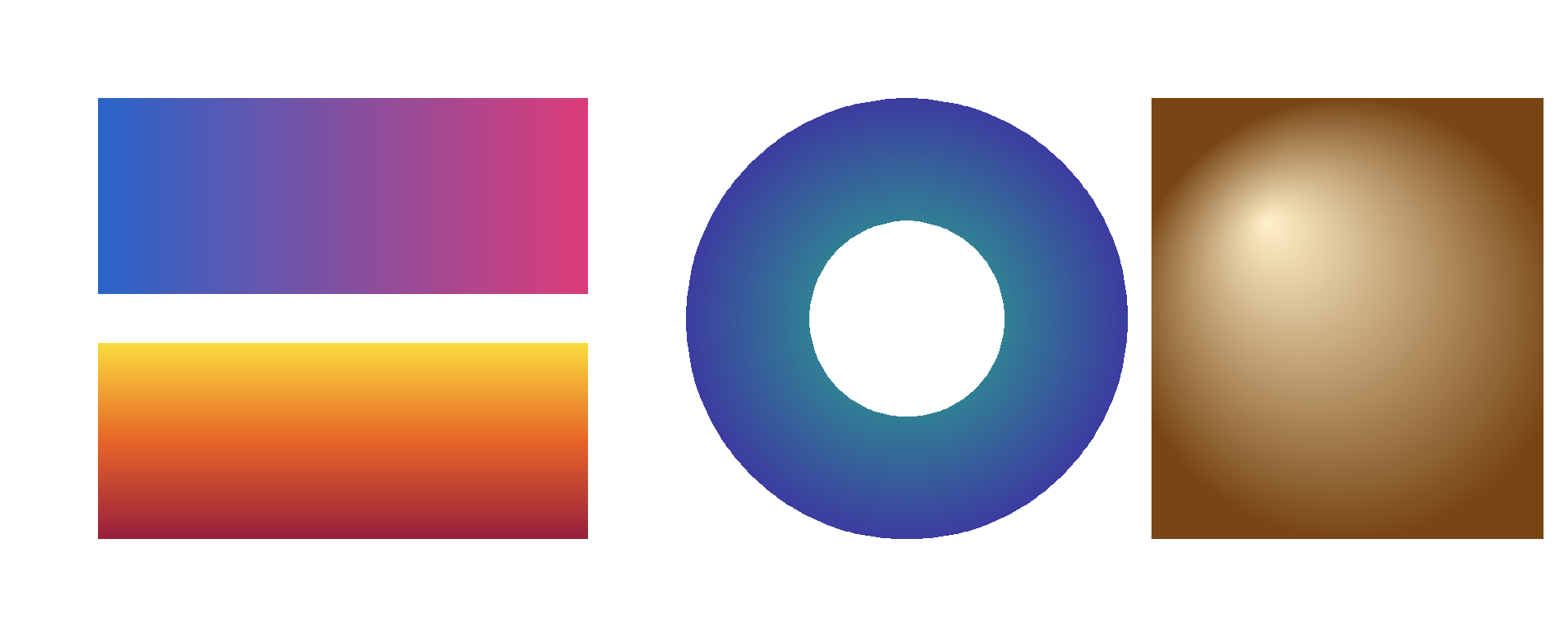
Apply linear and radial gradients to rectangles and paths.
Usage
from canvas.color import Color
from canvas.buffer import Canvas
from canvas.gradient import LinearGradient, RadialGradient
from canvas.path import Path, fill_path_gradient, fill_path_radial_gradient
from canvas.shapes.rects import (
    fill_rect_gradient,
    fill_rect_radial_gradient,
)
from canvas.io.bmp import write_bmp
from canvas.io.png import write_png


def main() raises:
    var c = Canvas(1920, 780, Color(255, 255, 255))

    # A horizontal bar-fill gradient; the axis matches the rect's
    # width, so its two stops land exactly on the edges.
    var horizontal = LinearGradient(120.0, 0.0, 720.0, 0.0)
    horizontal.add_stop(0.0, Color(40, 100, 200))
    horizontal.add_stop(1.0, Color(220, 60, 120))
    fill_rect_gradient(c, 120, 120, 600, 240, horizontal)

    # A vertical, three-stop gradient on a second rect.
    var vertical = LinearGradient(0.0, 420.0, 0.0, 660.0)
    vertical.add_stop(0.0, Color(250, 220, 60))
    vertical.add_stop(0.5, Color(230, 100, 40))
    vertical.add_stop(1.0, Color(150, 30, 60))
    fill_rect_gradient(c, 120, 420, 600, 240, vertical)

    # fill_path_gradient on a donut (see examples/path.mojo): the
    # gradient applies per pixel across the outer shape and around the
    # punched-through hole.
    var donut = Path()
    var cx = 1110.0
    var cy = 390.0
    var k = 0.5523
    var r_outer = 270.0
    var ko = r_outer * k
    donut.move_to(cx + r_outer, cy)
    donut.cubic_curve_to(
        cx + r_outer, cy + ko, cx + ko, cy + r_outer, cx, cy + r_outer
    )
    donut.cubic_curve_to(
        cx - ko, cy + r_outer, cx - r_outer, cy + ko, cx - r_outer, cy
    )
    donut.cubic_curve_to(
        cx - r_outer, cy - ko, cx - ko, cy - r_outer, cx, cy - r_outer
    )
    donut.cubic_curve_to(
        cx + ko, cy - r_outer, cx + r_outer, cy - ko, cx + r_outer, cy
    )
    donut.close()

    var r_inner = 120.0
    var ki = r_inner * k
    donut.move_to(cx + r_inner, cy)
    donut.cubic_curve_to(
        cx + r_inner, cy + ki, cx + ki, cy + r_inner, cx, cy + r_inner
    )
    donut.cubic_curve_to(
        cx - ki, cy + r_inner, cx - r_inner, cy + ki, cx - r_inner, cy
    )
    donut.cubic_curve_to(
        cx - r_inner, cy - ki, cx - ki, cy - r_inner, cx, cy - r_inner
    )
    donut.cubic_curve_to(
        cx + ki, cy - r_inner, cx + r_inner, cy - ki, cx + r_inner, cy
    )
    donut.close()

    var donut_radial = RadialGradient(cx, cy, r_outer)
    donut_radial.add_stop(0.0, Color(40, 180, 140))
    donut_radial.add_stop(1.0, Color(60, 60, 160))
    fill_path_radial_gradient(c, donut, donut_radial)

    # A rectangular swatch with a radial highlight and no circle
    # primitive involved -- just a rect sourcing its fill from a
    # RadialGradient, as a glow panel background or a legend swatch
    # wanting a soft highlight would. The focal point sits up and to
    # the left of the outer circle's center, so the highlight reads
    # as a light from that side rather than a glow from the middle.
    var swatch_cx = 1650.0
    var swatch_cy = 390.0
    var swatch_radial = RadialGradient(
        swatch_cx, swatch_cy, 270.0, fx=swatch_cx - 100.0, fy=swatch_cy - 120.0
    )
    swatch_radial.add_stop(0.0, Color(255, 240, 200))
    swatch_radial.add_stop(1.0, Color(120, 70, 20))
    fill_rect_radial_gradient(c, 1410, 120, 480, 540, swatch_radial)

    write_bmp(c, "examples/out_gradient.bmp")
    write_png(c, "examples/out_gradient.png")
    print("wrote examples/out_gradient.bmp and .png")