Text
Text
Render aligned and rotated text from system fonts.
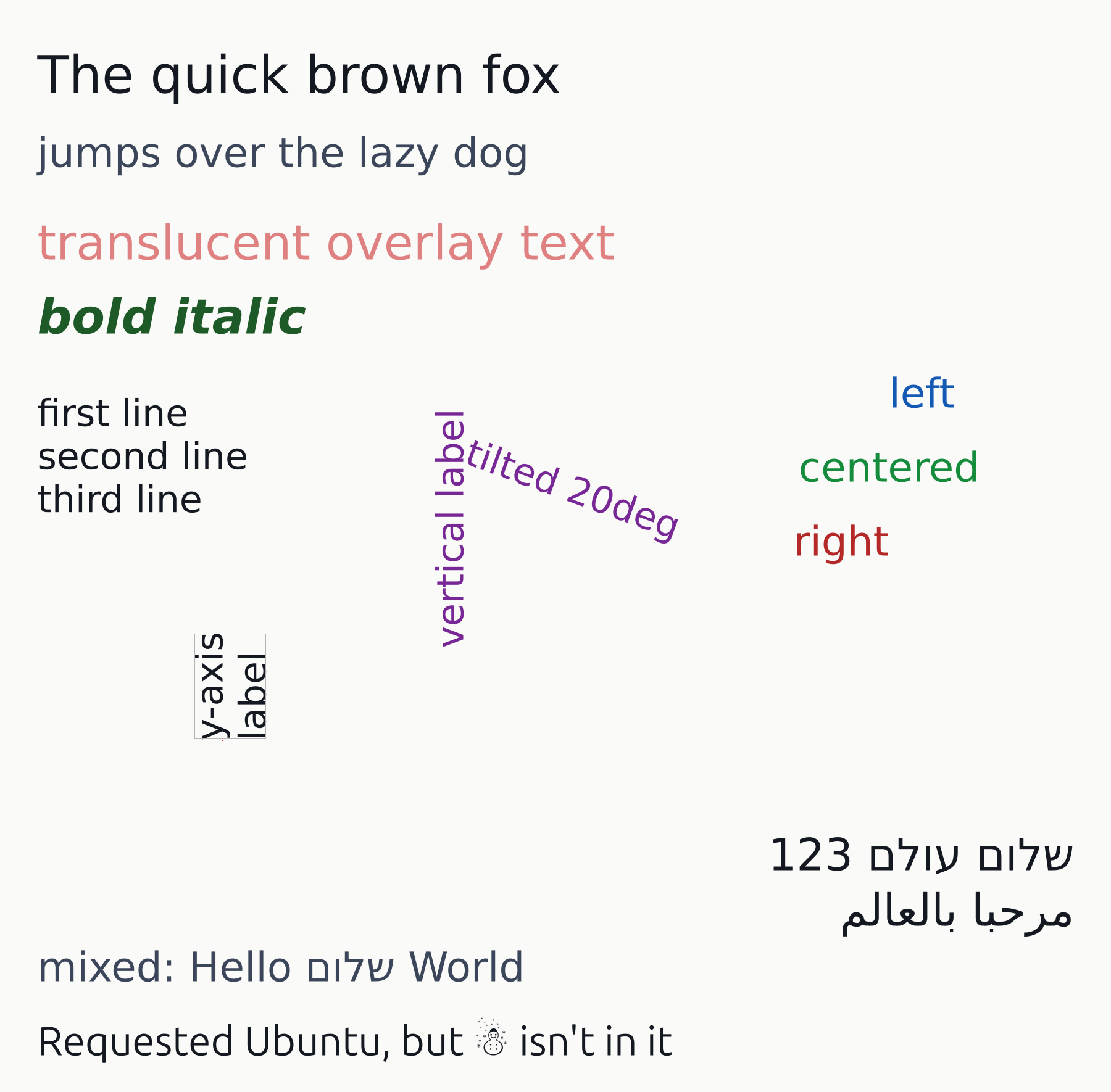
Usage
from std.math import pi

from canvas.text.font_discovery import FontSlant, FontWeight

from canvas.color import Color
from canvas.buffer import Canvas
from canvas.text.render import draw_text, measure_text_block, TextAlign
from canvas.shapes.rects import draw_rect
from canvas.io.bmp import write_bmp
from canvas.io.png import write_png


def main() raises:
    var c = Canvas(1800, 1770, Color(250, 250, 248))

    draw_text(c, 60, 150, "The quick brown fox", Color(20, 24, 32), 84.0)
    draw_text(c, 60, 270, "jumps over the lazy dog", Color(60, 70, 90), 66.0)

    # Translucent color over a non-white background: the same
    # unpremultiply + set_pixel blend path any other translucent
    # primitive takes.
    draw_text(
        c, 60, 420, "translucent overlay text", Color(200, 30, 30, 140), 78.0
    )
    draw_text(
        c,
        60,
        540,
        "bold italic",
        Color(30, 90, 40),
        78.0,
        weight=FontWeight.BOLD,
        slant=FontSlant.ITALIC,
    )

    # Multi-line: one draw_text call, "\n"-separated -- line-break
    # handling this module does itself (see _layout_block).
    draw_text(
        c,
        60,
        690,
        "first line\nsecond line\nthird line",
        Color(20, 24, 32),
        60.0,
    )

    # Rotation: tilted axis-tick-label-style text, and a fully
    # vertical y-axis-label-style one -- both rotate around their own
    # (x, y) anchor, marked here with a small dot for reference.
    draw_text(
        c,
        750,
        750,
        "tilted 20deg",
        Color(120, 40, 150),
        60.0,
        rotation=pi / 9.0,
    )
    c.set_pixel(750, 750, Color(255, 0, 0))
    draw_text(
        c,
        750,
        1050,
        "vertical label",
        Color(120, 40, 150),
        60.0,
        rotation=-pi / 2.0,
    )
    c.set_pixel(750, 1050, Color(255, 0, 0))

    # Alignment: left/center/right all anchored on the same x -- a
    # guide line marks that shared anchor so the three relationships
    # (starts at, straddles, ends at) are visible directly.
    var guide_x = 1440
    for yy in range(600, 1020):
        c.set_pixel(guide_x, yy, Color(210, 210, 210))
    draw_text(
        c, guide_x, 660, "left", Color(20, 90, 180), 66.0, align=TextAlign.LEFT
    )
    draw_text(
        c,
        guide_x,
        780,
        "centered",
        Color(20, 140, 60),
        66.0,
        align=TextAlign.CENTER,
    )
    draw_text(
        c,
        guide_x,
        900,
        "right",
        Color(180, 40, 40),
        66.0,
        align=TextAlign.RIGHT,
    )

    # measure_text_block, for axis-label layout: knowing a rotated
    # block's footprint before drawing it, to reserve margin or check
    # overlap with a neighbor. The same block is drawn twice -- once
    # for real, once as an outline rect built from the predicted box at
    # the same anchor -- so an outline hugging the ink shows prediction
    # and render agree.
    var label_x = 360
    var label_y = 1200
    var label_text = "y-axis\nlabel"
    var label_rotation = -pi / 2.0
    draw_text(
        c,
        label_x,
        label_y,
        label_text,
        Color(20, 24, 32),
        60.0,
        rotation=label_rotation,
    )
    c.set_pixel(label_x, label_y, Color(255, 0, 0))
    var bounds = measure_text_block(label_text, 60.0, rotation=label_rotation)
    draw_rect(
        c,
        label_x + Int(bounds.x),
        label_y + Int(bounds.y),
        Int(bounds.width),
        Int(bounds.height),
        Color(180, 180, 180),
    )

    # Bidirectional text (bidi.mojo): Hebrew renders fully, Arabic gets
    # correct ordering and mirroring with each letter in its isolated
    # form. A digit run inside RTL text stays in reading order ("123",
    # not "321"), and TextAlign.RIGHT anchors as it does for LTR --
    # both on the same line here.
    draw_text(
        c,
        1740,
        1410,
        "שלום עולם 123",
        Color(20, 24, 32),
        72.0,
        align=TextAlign.RIGHT,
    )
    draw_text(
        c,
        1740,
        1500,
        "مرحبا بالعالم",
        Color(20, 24, 32),
        72.0,
        align=TextAlign.RIGHT,
    )
    draw_text(c, 60, 1590, "mixed: Hello שלום World", Color(60, 70, 90), 66.0)

    # Font fallback (_resolve_glyph, via resolve_font_file_for_char):
    # the requested "Ubuntu" family has no snowman glyph, so matching
    # resolves a different installed font for that one character rather
    # than falling through to an empty box.
    draw_text(
        c,
        60,
        1710,
        "Requested Ubuntu, but ☃ isn't in it",
        Color(20, 24, 32),
        66.0,
        family="Ubuntu",
    )

    write_bmp(c, "examples/out_text.bmp")
    write_png(c, "examples/out_text.png")
    print("wrote examples/out_text.bmp and .png")