Text
canvas_mojo resolves installed fonts, shapes text, reads glyph outlines, and renders them without an external font library. Results depend on the fonts installed on the machine.
Draw text
The (x, y) anchor is on the baseline. Alignment controls the anchor’s
horizontal relationship to each line:
from canvas import Color, FontCache, TextAlign, draw_text

var cache = FontCache()
draw_text(
    canvas,
    300,
    80,
    "Centered title",
    Color(20, 20, 20),
    32.0,
    align=TextAlign.CENTER,
    cache=cache,
)
family accepts an installed family name or a generic alias such as
"Sans", "Serif", or "Monospace". FontSlant and FontWeight
select a face within the family. Missing glyphs may be resolved from a
fallback font.
Reuse a FontCache
FontCache() is cheap to construct and scans nothing immediately. Its
first lookup initializes the font database. Reuse one cache across
related measurement and drawing calls so resolved paths, parsed faces,
and rasterized glyph masks can be shared.
The overloads without cache= remain convenient for isolated calls.
Choose a measurement API
measure_text treats its input as one line and returns TextMetrics:
widthandheightdescribe the line’s tight ink size.advanceis the distance to the next text position.
measure_text_block handles newline-separated lines, alignment, and
rotation. It returns TextBlockBounds, an anchor-relative ink bounding
box with x, y, width, and height.
Neither function draws into a canvas.
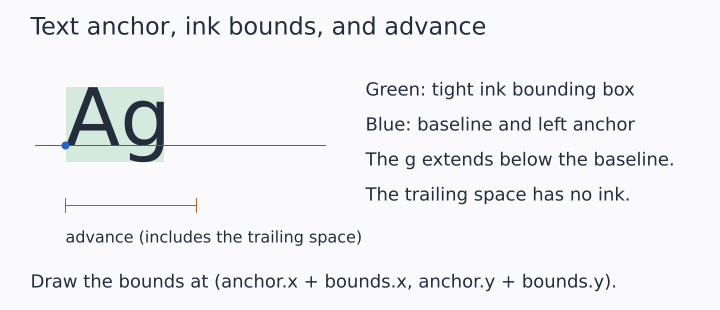
The illustrated string is "Ag ", including a trailing space. The
space increases the advance without enlarging the ink box. A descender
such as g extends below the baseline, so the anchor is neither the
top-left nor the bottom-left of the ink.
To place an ink box on the canvas, add the anchor to its offsets:
(anchor_x + bounds.x, anchor_y + bounds.y). Use advance when placing
the next run of text. Exact bounds depend on the font selected on your
machine. Illustration source
Measure and draw one prepared layout
Prepare text when the same layout must be measured and drawn:
from canvas import draw_layout, measure_layout, prepare_text

var layout = prepare_text(
    "Prepared title",
    32.0,
    align=TextAlign.CENTER,
    cache=cache,
)
var bounds = measure_layout(layout)
draw_layout(canvas, 300.0, 80.0, layout, Color(20, 20, 20), cache=cache)
A TextLayout retains the string and every option that affects shaping
or placement, but not the anchor or color. It can be drawn at several
positions and colors. Draw it with the same FontCache used to prepare
it because its glyph indices refer to faces owned by that cache.
Backend differences
Canvasrasterizes glyph outlines and color bitmap glyphs.SvgCanvas.draw_textemits an SVG text element using a CSS family value.PdfCanvas.draw_textembeds used font subsets and a ToUnicode map.
draw_text is on DrawTarget, with a cache= keyword, so code generic
over the trait can label what it draws; stroke_text and
draw_text_on_path are backend methods.
Draw one label from several runs
A label whose pieces differ in size or slant, an italic variable or a
superscript, is a list of TextRuns drawn by draw_text_runs, on every
backend. Each run has its text, size and slant, a dx that moves the pen
from where the previous run ended, and a dy that is its baseline relative
to the label’s, negative for a superscript:
var runs: List[TextRun] = [
    TextRun("E", 18.0, slant=FontSlant.ITALIC),
    TextRun(" = ", 18.0),
    TextRun("mc", 18.0, slant=FontSlant.ITALIC),
    TextRun("2", 12.6, dy=-6.3),
]
target.draw_text_runs(x, y, runs, color, align=TextAlign.CENTER, cache=cache)
Canvas and PdfCanvas draw each run with draw_text at the anchor
text_run_anchors measures for it. SvgCanvas writes one <text> element
with a <tspan> per run, so the label stays one string to select or copy,
and the viewer’s font metrics place the runs, as they do a single label.