Vector Output
Vector Output
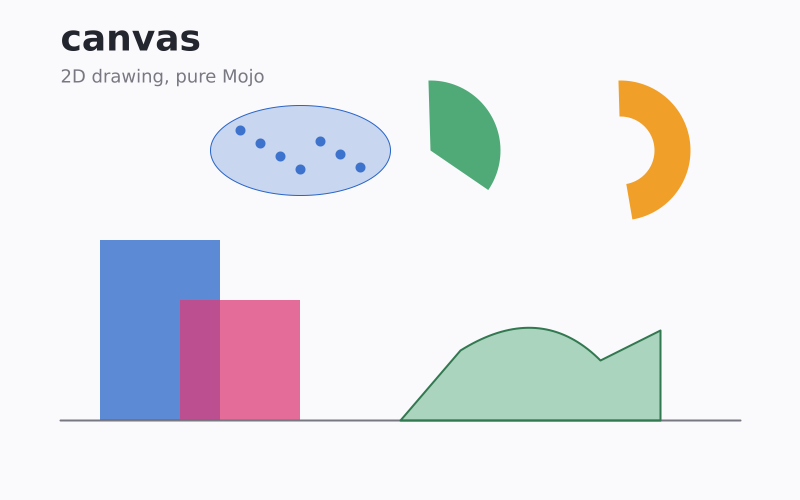
Render one DrawTarget routine to PNG, SVG, and PDF.
Usage
from canvas.color import Color
from canvas.path import Path
from canvas.buffer import Canvas
from canvas.vector.draw_target import DrawTarget
from canvas.vector.pdf import PdfCanvas, write_pdf
from canvas.vector.svg import SvgCanvas, write_svg
from canvas.io.png import write_png
from canvas.text.render import draw_text, TextAlign
from canvas.text.font_discovery import FontWeight


def draw_scene[T: DrawTarget](mut target: T) raises:
    """Draw one scene through the trait, with no knowledge of which
    backend is behind it -- this exact function body produces both
    out_vector.png and out_vector.svg.
    """
    # Background panel and a baseline, via the two cheapest primitives.
    target.fill_rect(0, 0, 800, 500, Color(250, 250, 252))
    target.draw_line_aa(60, 420, 740, 420, Color(120, 120, 130), 2.0)

    # Bars, overlapping and translucent, so the blend is visible where
    # they cross rather than the last one simply winning.
    target.fill_rect(100, 240, 120, 180, Color(40, 100, 200, 190))
    target.fill_rect(180, 300, 120, 120, Color(220, 60, 120, 190))

    # A pie wedge and a donut segment -- the two arc primitives.
    target.fill_arc_aa(430.0, 150.0, 70.0, -1.6, 0.6, Color(80, 170, 120))
    target.fill_ring_sector_aa(
        620.0, 150.0, 34.0, 70.0, -1.6, 1.4, Color(240, 160, 40)
    )

    # Scatter points, plus the error ellipse around them. An ellipse is
    # the one shape `fill_path_aa` cannot stand in for exactly -- see
    # `DrawTarget`'s own docstring -- which is why both an ellipse fill
    # and an ellipse outline are on the trait.
    target.fill_ellipse_aa(300, 150, 90, 45, Color(40, 100, 200, 60))
    target.draw_ellipse_aa(300, 150, 90, 45, Color(40, 100, 200))
    for i in range(7):
        var x = 240 + i * 20
        var y = 130 + (i * 13) % 41
        target.fill_circle_aa(x, y, 5, Color(40, 100, 200, 220))

    # An area shape and its stroked outline, both from one Path.
    var area = Path()
    area.move_to(400.0, 420.0)
    area.line_to(460.0, 350.0)
    area.quad_curve_to(540.0, 300.0, 600.0, 360.0)
    area.line_to(660.0, 330.0)
    area.line_to(660.0, 420.0)
    area.close()
    target.fill_path_aa(area, Color(80, 170, 120, 120))
    target.stroke_path_aa(area, Color(50, 120, 80), 2.0)


def main() raises:
    var canvas = Canvas(800, 500, Color(255, 255, 255))
    draw_scene(canvas)
    draw_text(
        canvas,
        60,
        50,
        "canvas",
        Color(35, 38, 46),
        36.0,
        weight=FontWeight.BOLD,
    )
    draw_text(
        canvas, 60, 82, "2D drawing, pure Mojo", Color(120, 120, 130), 18.0
    )
    write_png(canvas, "examples/out_vector.png")

    var svg = SvgCanvas(800, 500)
    draw_scene(svg)
    svg.draw_text(
        60,
        50,
        "canvas",
        Color(35, 38, 46),
        36.0,
        TextAlign.LEFT,
        weight=FontWeight.BOLD,
    )
    svg.draw_text(
        60,
        82,
        "2D drawing, pure Mojo",
        Color(120, 120, 130),
        18.0,
        TextAlign.LEFT,
    )
    write_svg(svg, "examples/out_vector.svg")

    # And a PDF page, the third backend: text there is glyph outlines
    # through the same layout the raster backend uses.
    var pdf = PdfCanvas(800, 500)
    pdf.fill_rect(0, 0, 800, 500, Color(255, 255, 255))
    draw_scene(pdf)
    pdf.draw_text(
        60.0, 50.0, "canvas", Color(35, 38, 46), 36.0, weight=FontWeight.BOLD
    )
    pdf.draw_text(
        60.0, 82.0, "2D drawing, pure Mojo", Color(120, 120, 130), 18.0
    )
    write_pdf(pdf, "examples/out_vector.pdf")

    print("wrote examples/out_vector.png, .svg and .pdf")
    print("  same draw_scene() call, three backends")