Coordinates and Colors
canvas_mojo uses a top-left origin. X increases to the right and y increases downward.
Pixels and geometry
Pixel (x, y) is the square centered at (x, y), extending from
x - 0.5 to x + 0.5 and from y - 0.5 to y + 0.5.
Integer rectangle arguments identify pixels. This fills columns 20 through 59 and rows 10 through 39:
canvas.fill_rect(20, 10, 40, 30, color)Floating-point rectangle arguments describe geometric edges. Each edge is snapped to the nearest pixel boundary before rasterization:
canvas.fill_rect(19.5, 9.5, 40.0, 30.0, color)Those two calls cover the same raster pixels. Other floating-point shape arguments, such as circle centers and path points, retain their subpixel positions.
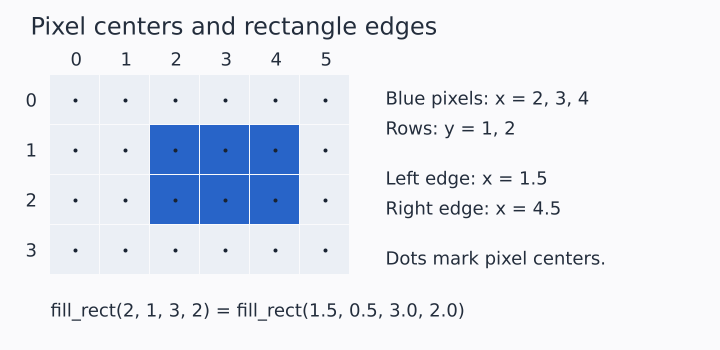
The illustration enlarges a six-by-four canvas. Its blue rectangle is three pixels wide, although the first and last pixel centers are only two units apart. Count pixel squares when specifying an integer width; use their outer edges when specifying floating-point geometry.
Angles
Angles are radians. Because y increases downward, positive angles turn
clockwise on the rendered canvas. Arc functions sweep from
start_angle to end_angle.
from std.math import pi

canvas.fill_arc_aa(100.0, 100.0, 70.0, 0.0, pi / 2.0, color)
This wedge begins at the right side of the circle and sweeps toward the bottom.
Anti-aliasing
Functions ending in _aa compute partial coverage at an edge. Plain
variants use hard pixel decisions. Prefer _aa functions for displayed
graphics and plain functions when hard pixel boundaries are intentional.
The supersample parameter controls sampled coverage for operations that
use it. Exact-area operations accept the parameter for API consistency
but may not use it.
Color and alpha
Color(r, g, b, a=255) stores four 8-bit channels using straight alpha.
An alpha of 0 is transparent and 255 is opaque.
var blue = Color(40, 100, 200)
var translucent_blue = Color(40, 100, 200, 128)
Drawing uses source-over compositing by default. Shape rasterizers write each destination pixel once per operation, so translucent fills do not darken their own internal seams.
ColorSpace.SRGB is the default. Set ColorSpace.LINEAR when subsequent
source-over blending or gradient interpolation should occur in linear
light:
from canvas import ColorSpace

canvas.set_color_space(ColorSpace.LINEAR)
Blend modes other than source-over use their defined sRGB formulas.