Paths
Paths
Build and fill a multi-subpath shape with lines and Bezier curves.
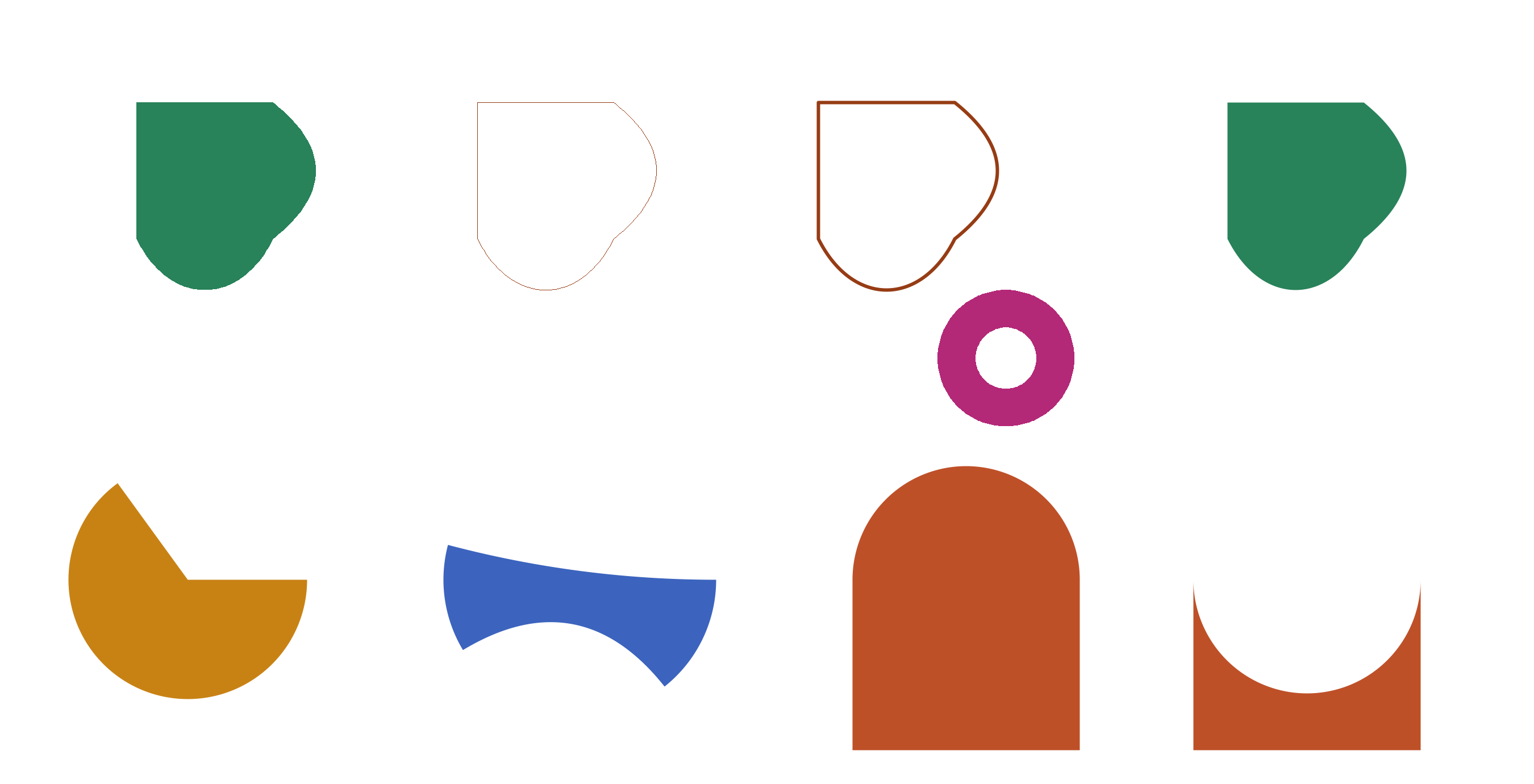
Usage
from std.math import cos, pi, sin

from canvas.color import Color
from canvas.buffer import Canvas
from canvas.path import (
    Path,
    fill_path,
    fill_path_aa,
    stroke_path,
    stroke_path_aa,
)
from canvas.io.bmp import write_bmp
from canvas.io.png import write_png


def main() raises:
    var c = Canvas(2700, 1380, Color(255, 255, 255))

    # A rounded, leaf-like shape mixing all three curve/line command
    # types in one sub-path, filled solid.
    var leaf = Path()
    leaf.move_to(240.0, 180.0)
    leaf.line_to(480.0, 180.0)
    leaf.quad_curve_to(630.0, 300.0, 480.0, 420.0)
    leaf.cubic_curve_to(420.0, 540.0, 300.0, 540.0, 240.0, 420.0)
    leaf.close()
    fill_path(c, leaf, Color(40, 130, 90))

    # The same outline, stroked instead of filled -- hard-edged on the
    # left half, AA on the right, so the jaggedness difference is
    # directly comparable (same technique circles.mojo/ellipse.mojo
    # use elsewhere in this examples/ directory).
    var outline_hard = Path()
    outline_hard.move_to(840.0, 180.0)
    outline_hard.line_to(1080.0, 180.0)
    outline_hard.quad_curve_to(1230.0, 300.0, 1080.0, 420.0)
    outline_hard.cubic_curve_to(1020.0, 540.0, 900.0, 540.0, 840.0, 420.0)
    outline_hard.close()
    stroke_path(c, outline_hard, Color(150, 60, 20))

    var outline_aa = Path()
    outline_aa.move_to(1440.0, 180.0)
    outline_aa.line_to(1680.0, 180.0)
    outline_aa.quad_curve_to(1830.0, 300.0, 1680.0, 420.0)
    outline_aa.cubic_curve_to(1620.0, 540.0, 1500.0, 540.0, 1440.0, 420.0)
    outline_aa.close()
    stroke_path_aa(c, outline_aa, Color(150, 60, 20), width=6.0)

    # A donut: an outer circle-ish sub-path (approximated with cubic
    # curves, the standard 4-curve circle trick) plus an inner one --
    # fill_path combines both sub-paths' crossings, punching the hole.
    var donut = Path()
    var cx = 1770.0
    var cy = 630.0
    var k = 0.5523  # magic constant for a 4-cubic circle approximation
    var r_outer = 120.0
    var ko = r_outer * k
    donut.move_to(cx + r_outer, cy)
    donut.cubic_curve_to(
        cx + r_outer, cy + ko, cx + ko, cy + r_outer, cx, cy + r_outer
    )
    donut.cubic_curve_to(
        cx - ko, cy + r_outer, cx - r_outer, cy + ko, cx - r_outer, cy
    )
    donut.cubic_curve_to(
        cx - r_outer, cy - ko, cx - ko, cy - r_outer, cx, cy - r_outer
    )
    donut.cubic_curve_to(
        cx + ko, cy - r_outer, cx + r_outer, cy - ko, cx + r_outer, cy
    )
    donut.close()

    var r_inner = 54.0
    var ki = r_inner * k
    donut.move_to(cx + r_inner, cy)
    donut.cubic_curve_to(
        cx + r_inner, cy + ki, cx + ki, cy + r_inner, cx, cy + r_inner
    )
    donut.cubic_curve_to(
        cx - ki, cy + r_inner, cx - r_inner, cy + ki, cx - r_inner, cy
    )
    donut.cubic_curve_to(
        cx - r_inner, cy - ki, cx - ki, cy - r_inner, cx, cy - r_inner
    )
    donut.cubic_curve_to(
        cx + ki, cy - r_inner, cx + r_inner, cy - ki, cx + r_inner, cy
    )
    donut.close()

    fill_path(c, donut, Color(180, 40, 120))

    # The same leaf shape as the very first one, filled via
    # fill_path_aa instead of fill_path -- directly comparable to it
    # since it's an identical curved outline, only the fill's edge
    # treatment differs. Curves are exactly where fill_path's
    # hard-edged jaggedness is most visible, unlike the axis-aligned
    # shapes fill_polygon(_aa) examples tend to use.
    var leaf_aa = Path()
    leaf_aa.move_to(2160.0, 180.0)
    leaf_aa.line_to(2400.0, 180.0)
    leaf_aa.quad_curve_to(2550.0, 300.0, 2400.0, 420.0)
    leaf_aa.cubic_curve_to(2340.0, 540.0, 2220.0, 540.0, 2160.0, 420.0)
    leaf_aa.close()
    fill_path_aa(c, leaf_aa, Color(40, 130, 90))

    # A pie-slice wedge, built directly from arc_to instead of
    # canvas.shapes.arcs' own discrete fill_arc -- arc_to's own
    # flattening reuses that same function's _arc_points helper (see
    # path.mojo's own docstring), so move_to(arc's own start) ->
    # arc_to(...) -> line_to(center) -> close() traces the identical
    # curve fill_arc's own fill_polygon call does, not just a close
    # approximation (see tests/test_path.mojo's own parity test).
    var wedge_cx = 330.0
    var wedge_cy = 1020.0
    var wedge_r = 210.0
    var wedge = Path()
    wedge.move_to(wedge_cx + wedge_r * cos(0.0), wedge_cy + wedge_r * sin(0.0))
    wedge.arc_to(wedge_cx, wedge_cy, wedge_r, 0.0, pi * 1.3)
    wedge.line_to(wedge_cx, wedge_cy)
    wedge.close()
    fill_path_aa(c, wedge, Color(200, 130, 20))

    # A chord-diagram-style ribbon: two disjoint arcs on one circle
    # (a "source" and a "target" span), connected by quadratic curves
    # pulled toward the circle's own center -- exactly the shape a
    # chord diagram's flow ribbons need, and exactly what wasn't
    # buildable as one real curved path before arc_to existed (the rim
    # had to be flattened to short straight-line segments by hand
    # instead).
    var ring_cx = 1020.0
    var ring_cy = 1020.0
    var ring_r = 240.0
    var ribbon = Path()
    ribbon.move_to(ring_cx + ring_r * cos(0.0), ring_cy + ring_r * sin(0.0))
    ribbon.arc_to(ring_cx, ring_cy, ring_r, 0.0, 0.9)
    ribbon.quad_curve_to(
        ring_cx,
        ring_cy,
        ring_cx + ring_r * cos(2.6),
        ring_cy + ring_r * sin(2.6),
    )
    ribbon.arc_to(ring_cx, ring_cy, ring_r, 2.6, 3.4)
    ribbon.quad_curve_to(
        ring_cx,
        ring_cy,
        ring_cx + ring_r * cos(0.0),
        ring_cy + ring_r * sin(0.0),
    )
    ribbon.close()
    fill_path_aa(c, ribbon, Color(60, 100, 190))

    # Sweep direction, as the only difference between two shapes.
    # Both tabs are the same three lines plus one arc_to over the same
    # two endpoints on the top edge; the left one sweeps pi -> 2*pi and
    # the right one sweeps pi -> 0. Angles increase clockwise on screen
    # here (y grows downward), so the increasing sweep carries the arc
    # up and out of the shape while the decreasing one carries it down
    # and into it -- a bulge and a bite from the same four commands.
    var tab_y = 1020.0
    var tab_w = 400.0
    var tab_h = 300.0

    var bulge_x = 1500.0
    var bulge = Path()
    bulge.move_to(bulge_x, tab_y + tab_h)
    bulge.line_to(bulge_x, tab_y)
    bulge.arc_to(bulge_x + tab_w / 2.0, tab_y, tab_w / 2.0, pi, 2.0 * pi)
    bulge.line_to(bulge_x + tab_w, tab_y + tab_h)
    bulge.close()
    fill_path_aa(c, bulge, Color(190, 80, 40))

    var bite_x = 2100.0
    var bite = Path()
    bite.move_to(bite_x, tab_y + tab_h)
    bite.line_to(bite_x, tab_y)
    bite.arc_to(bite_x + tab_w / 2.0, tab_y, tab_w / 2.0, pi, 0.0)
    bite.line_to(bite_x + tab_w, tab_y + tab_h)
    bite.close()
    fill_path_aa(c, bite, Color(190, 80, 40))

    write_bmp(c, "examples/out_path.bmp")
    write_png(c, "examples/out_path.png")
    print("wrote examples/out_path.bmp and .png")