Transforms and State
Every drawing target maintains a current affine transform. Geometry is specified in user space and mapped through that transform when drawn.
Compose transforms
Each transform changes the coordinate system for subsequent drawing:
canvas.translate(200.0, 120.0)
canvas.rotate(0.5)
canvas.scale(2.0, 2.0)
canvas.fill_rect(-40, -20, 80, 40, color)
This establishes a local origin, rotates its axes, scales the local coordinates, and then draws the rectangle. Applied to a point, the resulting map scales first, then rotates, then translates. Stroke widths, caps, and dashes are constructed in user space and therefore scale with the geometry.
Order matters. With translate(60.0, 0.0) followed by
scale(2.0, 2.0), a point at local x = 20 lands at x = 100:
60 + 2 * 20. Reverse the calls and the translation is scaled too,
placing that point at x = 160: 2 * (60 + 20).
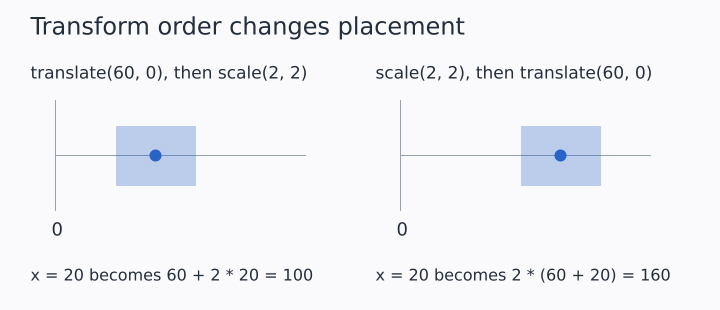
Each panel starts from its own labeled origin. The rectangle has the same size in both; its position changes with the transform order. Illustration source
Use transform(matrix) to append a Matrix2D, set_transform(matrix)
to replace the current map, and reset_transform() to return to the
identity.
Scope state with save and restore
save() records the current transform, rectangular clip, path-clip
depth, blend mode, and color space. restore() returns to that state:
canvas.save()
canvas.translate(200.0, 120.0)
canvas.rotate(0.5)
canvas.fill_rect(-40, -20, 80, 40, color)
canvas.restore()
Pair state changes with save and restore when a function should not
affect later drawing.
Clip drawing
push_clip(x, y, width, height) intersects subsequent drawing with a
rectangle. push_clip_path(path) creates an anti-aliased coverage mask
from a path. Nested clips only restrict the visible region further.
Use pop_clip or pop_clip_path to remove the corresponding clip, or
use restore to unwind clips added since save:
canvas.save()
canvas.push_clip(20, 20, 160, 100)
canvas.fill_circle_aa(100, 70, 80, color)
canvas.restore()
A clip path is transformed when pushed and then remains in device space. Later transform changes do not move an existing clip.
Transform2D versus canvas state
Transform2D maps a data coordinate through scale, rotation, and
translation and returns a point. It is useful when data preparation
needs the mapped coordinate explicitly.
Canvas transform state instead maps every primitive at draw time. Use it for local frames, repeated translated marks, and backend-generic drawing code.