Area
An area chart: a line chart with the region down to a zero baseline filled in, emphasizing a series’ magnitude and cumulative feel over its exact trend line.

Usage
from dataviz import area
from dataviz import save
from dataviz.core.colors import STEELBLUE
from dataviz import Theme

def main() raises:
    # Illustrative hourly solar output: zero overnight, a small
    # morning cloud dip, and a broad midday production peak.
    var hour: List[Float64] = [
        0, 1, 2, 3, 4, 5, 6, 7, 8, 9, 10, 11,
        12, 13, 14, 15, 16, 17, 18, 19, 20, 21, 22, 23,
    ]
    var output_mw: List[Float64] = [
        0, 0, 0, 0, 0, 0, 2, 9, 21, 34, 31, 52,
        63, 68, 66, 59, 48, 35, 20, 8, 1, 0, 0, 0,
    ]

    var c = area(
        hour,
        output_mw,
        title="Illustrative Solar Generation on a Clear Day",
        x_title="Hour of day",
        y_title="Output (MW)",
        theme=Theme(mark_color=STEELBLUE),
    )
    save(c, "docs/src/examples/out_area.svg")
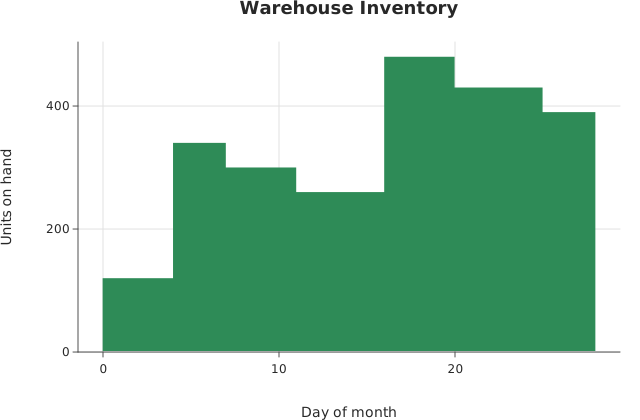
Stepped Area Chart
from dataviz import StepStyle, area
from dataviz import save
from dataviz.core.colors import SEAGREEN
from dataviz import Theme

def main() raises:
    # Units in the warehouse change only when a delivery arrives
    # or a shipment leaves, and hold flat in between. A straight
    # top edge would fill in a slow drift between counts that
    # never happened, and the fill would assign area to those
    # invented values; StepStyle.POST holds each count until the
    # day the next one was taken.
    var day: List[Float64] = [
        0.0, 4.0, 7.0, 11.0, 16.0, 20.0, 25.0, 28.0
    ]
    var units: List[Float64] = [
        120.0, 340.0, 300.0, 260.0, 480.0, 430.0, 390.0, 350.0
    ]

    var c = area(
        day,
        units,
        step=StepStyle.POST,
        title="Warehouse Inventory",
        theme=Theme(mark_color=SEAGREEN),
        x_title="Day of month",
        y_title="Units on hand",
    )
    save(c, "docs/src/examples/out_step_area.svg")
See Data shapes for shared input conventions.
Args:
x: The continuous x column, one entry per point.y: The continuous y column; the filled area runs from each point down to zero.step: Step (stairs) interpolation on the fill’s top edge –NONE(the default, straight segments), orPRE/MID/POSTfor a quantity that holds constant between samples rather than sliding between them. SeeStepStylefor which riser placement claims what, andPlot.mark_area()for why only the top edge steps.theme: Full styling knobs beyond this function’s own parameters (colors, margins, fonts, gridlines, …) – seeTheme’s docstring.width: Pixel width of the returnedPlot(.size()).height: Pixel height of the returnedPlot(.size()).title: The chart’s title, shown above the plot.x_title: The x-axis caption.y_title: The y-axis caption.
Related
Relevant API: area