Contour
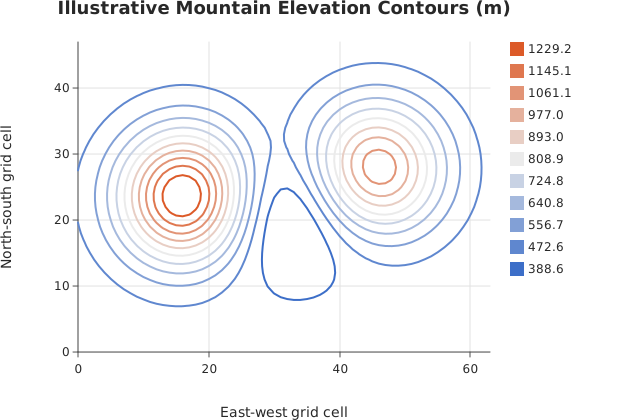
contour() over a long-form dataframe_mojo DataFrame (#743): one row per cell, with row and column giving the cell’s coordinates and value its height.
Usage
from std.math import exp

from dataviz import contour
from dataviz import save

def main() raises:
    # Illustrative elevation model: two ridges separated by a saddle.
    var z = List[List[Float64]]()
    for r in range(48):
        var row = List[Float64]()
        for c in range(64):
            var x = (Float64(c) - 31.5) / 10.0
            var y = (Float64(r) - 23.5) / 10.0
            var west = exp(-((x + 1.5) * (x + 1.5) + y * y))
            var east = exp(
                -((x - 1.4) * (x - 1.4) + (y - 0.4) * (y - 0.4))
            )
            var saddle = exp(-(x * x / 2.2 + (y + 0.2) * (y + 0.2)))
            row.append(420.0 + 980.0 * west + 760.0 * east - 260.0 * saddle)
        z.append(row^)

    var c = contour(
        z,
        level_count=11,
        title="Illustrative Mountain Elevation Contours (m)",
        x_title="East-west grid cell",
        y_title="North-south grid cell",
    )
    save(c, "docs/src/examples/out_contour.svg")
See Data shapes for shared input conventions.
Args:
df: The frame to read.row: The numeric column giving each cell’s row coordinate.column: The numeric column giving each cell’s column coordinate.value: The numeric column holding each cell.levels: Explicit contour levels; see the list overload.level_count: How many levels whenlevelsis empty.theme: Full styling knobs beyond this function’s own parameters.width: Pixel width of the returnedPlot(.size()).height: Pixel height of the returnedPlot(.size()).title: The chart’s title, shown above the plot.subtitle: A line under the title.x_title: The x-axis caption; defaults tocolumn.y_title: The y-axis caption; defaults torow.
Related
Related charts: Streamlines · Filled Contour
Relevant API: contour