Clustered Heatmap
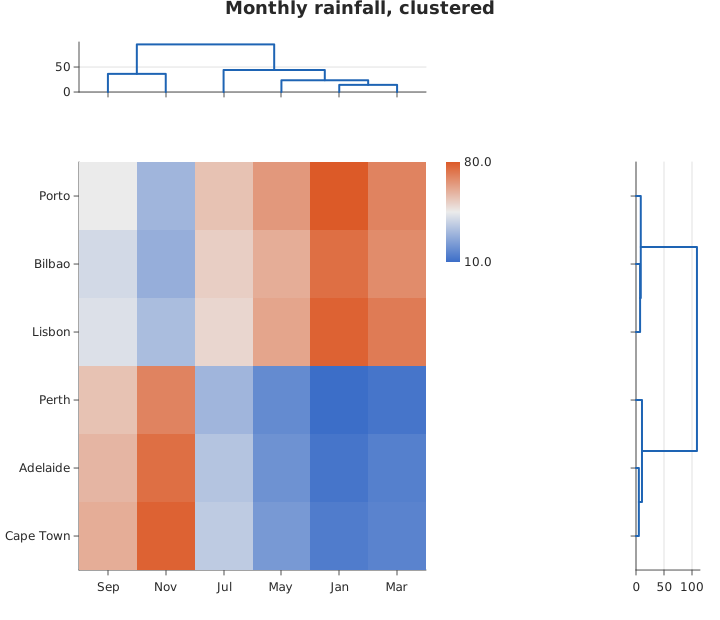
A heatmap with its rows and columns reordered by hierarchical clustering, and the merge tree drawn along each reordered edge (#355).
Usage
from dataviz import clustermap, save

def main() raises:
    # Illustrative monthly rainfall for six places, in mm, two
    # of them wet-winter and the rest wet-summer.
    var values: List[List[Float64]] = [
        [80.0, 70.0, 65.0, 55.0, 45.0, 30.0],
        [75.0, 68.0, 60.0, 52.0, 40.0, 28.0],
        [10.0, 12.0, 18.0, 30.0, 55.0, 70.0],
        [12.0, 15.0, 20.0, 34.0, 58.0, 75.0],
        [14.0, 16.0, 22.0, 36.0, 60.0, 78.0],
        [78.0, 72.0, 62.0, 50.0, 42.0, 32.0],
    ]
    var places: List[String] = [
        "Porto",
        "Bilbao",
        "Perth",
        "Adelaide",
        "Cape Town",
        "Lisbon",
    ]
    var months: List[String] = [
        "Jan",
        "Mar",
        "May",
        "Jul",
        "Sep",
        "Nov",
    ]
    var c = clustermap(
        values,
        places,
        months,
        title="Monthly rainfall, clustered",
    )
    save(c, "docs/src/examples/out_clustermap.svg")
See Data shapes for shared input conventions.
Args:
values: The matrix, one list per row, every row the same length.row_labels: One name per row; empty numbers them.col_labels: One name per column; empty numbers them.metric: How far apart two rows (or columns) are.method: How far apart two clusters are.theme: Applied to every panel.width: Figure width in points.height: Figure height in points.ratio: How many times a dendrogram panel’s size the heatmap is, so the default of 4 gives each tree a fifth of the figure.cluster_rows: Cluster and reorder the rows.cluster_cols: Cluster and reorder the columns.title: A figure title above the whole thing; the figure grows by the title’s band so the panels keep their sizes. Empty for none.
Related
Related charts: Pair Plot
Relevant API: clustermap