3D Arrows
quiver3d() over named columns of a dataframe_mojo DataFrame (#743). Each argument names a column instead of holding the values.
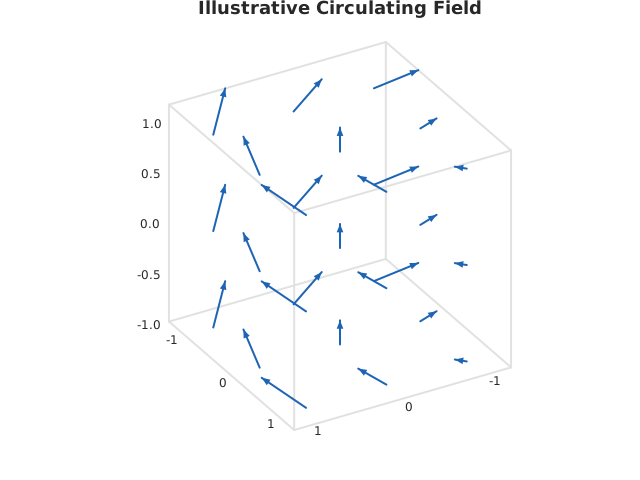
Usage
from dataviz import quiver3d, save

def main() raises:
    # Illustrative circulation: a field turning about the z axis
    # and drifting upward as it goes.
    var x = List[Float64]()
    var y = List[Float64]()
    var z = List[Float64]()
    var u = List[Float64]()
    var v = List[Float64]()
    var w = List[Float64]()
    for k in range(3):
        for j in range(3):
            for i in range(3):
                var px = Float64(i) - 1.0
                var py = Float64(j) - 1.0
                var pz = Float64(k) - 1.0
                x.append(px)
                y.append(py)
                z.append(pz)
                u.append(-py * 0.35)
                v.append(px * 0.35)
                w.append(0.25)

    var c = quiver3d(
        x, y, z, u, v, w, title="Illustrative Circulating Field"
    )
    save(c, "docs/src/examples/out_quiver3d.svg")
See Data shapes for shared input conventions.
Args:
df: The frame to read.x: The numeric column for this channel.y: The numeric column for this channel.z: The numeric column for this channel.u: The numeric column for this channel.v: The numeric column for this channel.w: The numeric column for this channel.elev: See the list overload.azim: See the list overload.theme: See the list overload.width: See the list overload.height: See the list overload.title: See the list overload.subtitle: See the list overload.
Related
Related charts: 3D Stems · 3D Ribbon
Relevant API: quiver3d