3D Ribbon
fill_between3d() over named columns of a dataframe_mojo DataFrame (#743). Each argument names a column instead of holding the values.
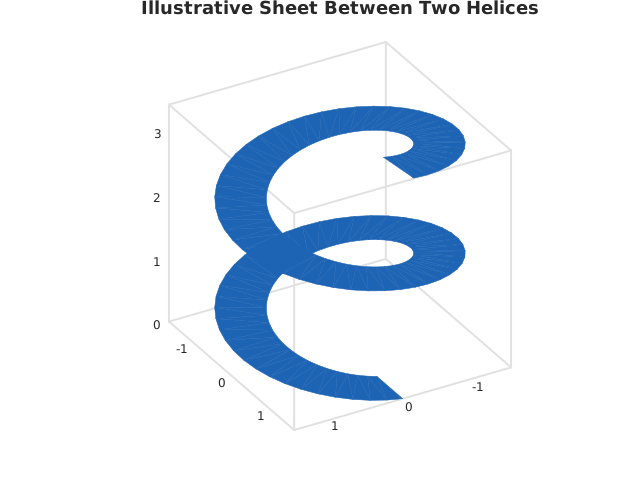
Usage
from std.math import cos, sin

from dataviz import fill_between3d, save

def main() raises:
    # Illustrative envelope: a helix and a wider one outside it,
    # with the sheet between them.
    var x1 = List[Float64]()
    var y1 = List[Float64]()
    var z1 = List[Float64]()
    var x2 = List[Float64]()
    var y2 = List[Float64]()
    var z2 = List[Float64]()
    for i in range(90):
        var t = Float64(i) * 0.14
        x1.append(cos(t))
        y1.append(sin(t))
        z1.append(Float64(i) * 0.04)
        x2.append(cos(t) * 1.7)
        y2.append(sin(t) * 1.7)
        z2.append(Float64(i) * 0.04)

    var c = fill_between3d(
        x1,
        y1,
        z1,
        x2,
        y2,
        z2,
        title="Illustrative Sheet Between Two Helices",
    )
    save(c, "docs/src/examples/out_fill_between3d.svg")
See Data shapes for shared input conventions.
Args:
df: The frame to read.x1: The numeric column for this channel.y1: The numeric column for this channel.z1: The numeric column for this channel.x2: The numeric column for this channel.y2: The numeric column for this channel.z2: The numeric column for this channel.elev: See the list overload.azim: See the list overload.theme: See the list overload.width: See the list overload.height: See the list overload.title: See the list overload.subtitle: See the list overload.
Related
Related charts: 3D Arrows
Relevant API: fill_between3d