Quadrilateral Mesh
Display a 2D array over cell boundaries you supply: imshow() for a grid whose rows and columns are not evenly spaced.
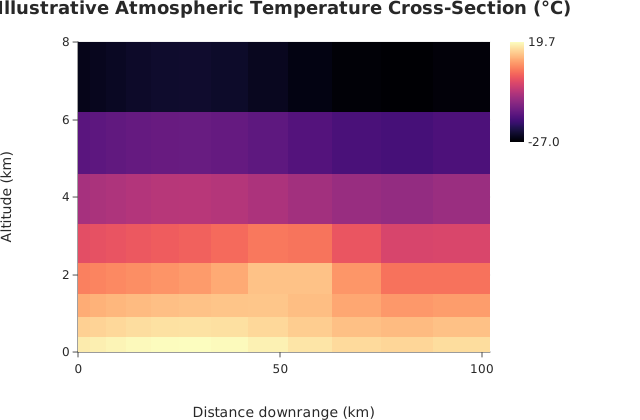
Usage
from std.math import exp, sin

from dataviz import pcolormesh
from dataviz.core.colormaps import magma
from dataviz import save
from dataviz import Theme

def main() raises:
    # Weather balloons are farther apart downrange and report at
    # uneven altitude bands, so each cell keeps its measured extent.
    var x_edges: List[Float64] = [
        0, 3, 7, 12, 18, 25, 33, 42, 52, 63, 75, 88, 102,
    ]
    var y_edges: List[Float64] = [
        0.0, 0.4, 0.9, 1.5, 2.3, 3.3, 4.6, 6.2, 8.0,
    ]

    var z = List[List[Float64]]()
    for r in range(len(y_edges) - 1):
        var row = List[Float64]()
        var altitude = (y_edges[r] + y_edges[r + 1]) / 2.0
        for c in range(len(x_edges) - 1):
            var distance = (x_edges[c] + x_edges[c + 1]) / 2.0
            var plume_x = (distance - 55.0) / 18.0
            var plume_y = (altitude - 2.2) / 0.9
            var temperature = 19.0 - 6.2 * altitude
            temperature += 2.0 * sin(distance / 17.0)
            temperature += 8.0 * exp(
                -(plume_x * plume_x + plume_y * plume_y)
            )
            row.append(temperature)
        z.append(row^)

    var chart = pcolormesh(
        x_edges,
        y_edges,
        z,
        theme=Theme(color_ramp=magma()),
        title="Illustrative Atmospheric Temperature Cross-Section (°C)",
        x_title="Distance downrange (km)",
        y_title="Altitude (km)",
    )
    save(chart, "docs/src/examples/out_pcolormesh.svg")
See Data shapes for shared input conventions.
Args:
x_edges: Column boundaries,cols + 1of them, strictly increasing.y_edges: Row boundaries,rows + 1of them, strictly increasing.z: The array, row-major (z[row][col]), rectangular and non-empty. Every value must be finite.theme: Full styling knobs beyond this function’s own parameters (colors, margins, fonts, gridlines, …) – seeTheme’s docstring.width: Pixel width of the returnedPlot(.size()).height: Pixel height of the returnedPlot(.size()).title: The chart’s title, shown above the plot.subtitle: A secondary line shown under the title.x_title: The x-axis caption.y_title: The y-axis caption.
Related
Related charts: Image · Calendar Heatmap
Relevant API: pcolormesh