2D Histogram
A 2D histogram: (x, y) points binned into a bins by bins grid of equal-width cells over each axis’s own range, each cell colored by how many points fell in it.
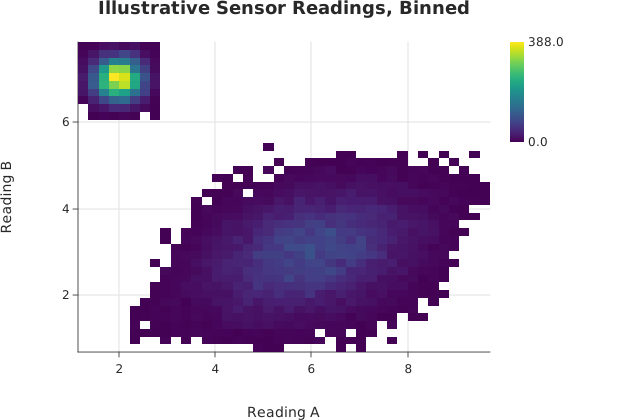
Usage
from dataviz import hist2d, save
from dataviz import Theme
from dataviz.core.colormaps import viridis

def main() raises:
    # Twenty thousand sensor readings that fall in two clusters,
    # one tight and one spread out; as a scatter they would be a
    # blob. A small linear congruential generator keeps the
    # example self-contained.
    var seed = 12345
    var xs = List[Float64]()
    var ys = List[Float64]()
    for i in range(20000):
        var u = List[Float64]()
        for _ in range(6):
            seed = (seed * 1103515245 + 12345) % 2147483648
            u.append(Float64(seed % 10000) / 10000.0 - 0.5)
        # Sums of uniforms are bell-shaped, which is all the
        # example needs.
        var gx = u[0] + u[1] + u[2]
        var gy = u[3] + u[4] + u[5]
        if i % 3 == 0:
            xs.append(2.0 + 0.6 * gx)
            ys.append(7.0 + 0.6 * gy)
        else:
            xs.append(6.0 + 2.2 * gx + 0.8 * gy)
            ys.append(3.0 + 1.6 * gy)
    var chart = hist2d(
        xs,
        ys,
        bins=40,
        theme=Theme(color_ramp=viridis()),
        title="Illustrative Sensor Readings, Binned",
        x_title="Reading A",
        y_title="Reading B",
    )
    save(chart, "docs/src/examples/out_hist2d.svg")
See Data shapes for shared input conventions.
Args:
x: The horizontal coordinates.y: The vertical coordinates, one perx.bins: Bins per axis, at least 1.log_x: Bin x evenly in log space and put it on a log axis, so every cell is the same width on screen (#718).log_y: The same for y.theme: Visual theme.width: Canvas width in pixels.height: Canvas height in pixels.title: Chart title.subtitle: Text under the title.x_title: Horizontal axis label.y_title: Vertical axis label.
Related
Related charts: Event Plot · Hexagonal Bins
Relevant API: hist2d