Estimate Bars
barplot() over named columns of a dataframe_mojo DataFrame (#743). Each argument names a column instead of holding the values. The axis titles default to the categories and values column names.
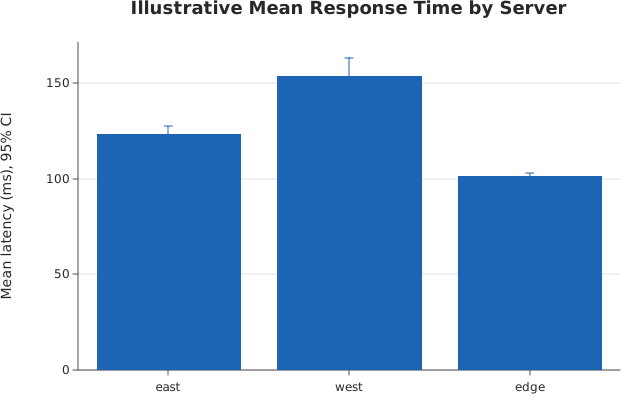
Usage
from dataviz import barplot, save

def main() raises:
    # Illustrative response times (ms) from repeated trials on
    # three servers: several observations per server, reduced to
    # a mean with its bootstrap 95% confidence interval.
    var servers = List[String]()
    var latency = List[Float64]()
    var a: List[Float64] = [118.0, 124.0, 131.0, 122.0, 127.0, 119.0]
    var b: List[Float64] = [142.0, 165.0, 139.0, 171.0, 150.0, 158.0]
    var c: List[Float64] = [101.0, 104.0, 99.0, 103.0, 100.0, 102.0]
    for v in a:
        servers.append("east")
        latency.append(v)
    for v in b:
        servers.append("west")
        latency.append(v)
    for v in c:
        servers.append("edge")
        latency.append(v)
    var chart = barplot(
        servers,
        latency,
        title="Illustrative Mean Response Time by Server",
        y_title="Mean latency (ms), 95% CI",
    )
    save(chart, "docs/src/examples/out_barplot.svg")
See Data shapes for shared input conventions.
Args:
df: The frame to read.categories: The string column for this channel.values: The numeric column for this channel.estimator: See the list overload.errorbar: See the list overload.seed: See the list overload.theme: See the list overload.width: See the list overload.height: See the list overload.title: See the list overload.subtitle: See the list overload.x_title: See the list overload.y_title: See the list overload.horizontal: See the list overload.
Related
Related charts: Estimate Line
Relevant API: barplot