Histogram
A histogram: continuous data grouped into bins and drawn as bar heights over a numeric x-axis, for showing a distribution’s shape (its center, spread, and skew) rather than each individual value.

Usage
from dataviz import histogram
from dataviz import save
from dataviz.core.colors import REBECCAPURPLE
from dataviz import Theme

def main() raises:
    # The shared illustrative checkout latency sample is intentionally
    # unsorted and right-skewed, so binning reveals its slow tail.
    var latency_ms: List[Int] = [
        84, 72, 91, 68, 75, 88, 79, 73, 96, 82,
        77, 69, 85, 74, 101, 80, 71, 93, 76, 87,
        83, 70, 78, 89, 81, 95, 67, 86, 72, 90,
        110, 124, 138, 156, 205, 98, 105, 118, 74, 82,
    ]

    var c = histogram(
        latency_ms,
        bins=10,
        title="Illustrative Checkout API Latency",
        theme=Theme(mark_color=REBECCAPURPLE),
        x_title="Latency (ms)",
        y_title="Requests",
    )
    save(c, "docs/src/examples/out_histogram.svg")
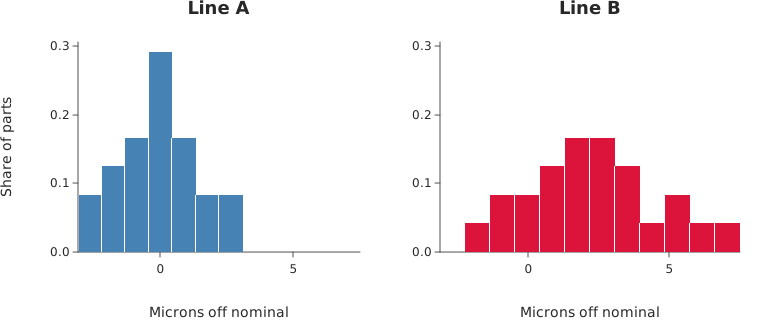
Shared Bins
from dataviz import save_facets
from dataviz import histogram
from dataviz.core.colors import CRIMSON, STEELBLUE
from dataviz.binned.histogram import HistStat, shared_bin_edges
from dataviz import Plot
from dataviz import Theme

def main() raises:
    # Two production lines, same part, measured in microns off
    # nominal. Line B runs wider AND is shifted high; the only way
    # to see both facts at once is for the two histograms to use
    # the same intervals, so a bar in one covers exactly the bar
    # beside it.
    var line_a: List[Float64] = [
        -3.1, -2.4, -2.0, -1.6, -1.5, -1.1, -0.9, -0.8, -0.6, -0.4,
        -0.3, -0.2, 0.0, 0.1, 0.2, 0.4, 0.5, 0.7, 0.9, 1.2,
        1.4, 1.8, 2.2, 2.9,
    ]
    var line_b: List[Float64] = [
        -2.2, -1.3, -0.5, 0.1, 0.4, 0.8, 1.0, 1.3, 1.5, 1.7,
        1.9, 2.0, 2.2, 2.4, 2.6, 2.8, 3.1, 3.4, 3.8, 4.3,
        4.9, 5.6, 6.4, 7.5,
    ]

    # One call, both samples: the pooled min and max in 12 equal
    # intervals. Binning each sample on its own range would give
    # the two charts different bars.
    var groups: List[List[Float64]] = [line_a.copy(), line_b.copy()]
    var edges = shared_bin_edges(groups, bins=12)

    # PROBABILITY, not COUNT, so the two panels are comparable
    # even when the samples are not the same size.
    var a = histogram(
        line_a,
        edges=edges,
        stat=HistStat.PROBABILITY,
        theme=Theme(mark_color=STEELBLUE, show_gridlines=False),
        width=380,
        height=320,
        title="Line A",
        x_title="Microns off nominal",
        y_title="Share of parts",
    )
    var b = histogram(
        line_b,
        edges=edges,
        stat=HistStat.PROBABILITY,
        theme=Theme(mark_color=CRIMSON, show_gridlines=False),
        width=380,
        height=320,
        title="Line B",
        x_title="Microns off nominal",
    )

    # Two panels rather than one overlay: render_layers() refuses
    # the explicit x-domain a histogram pins. The panels
    # still line up bar for bar, because the edges -- and so both
    # x-domains -- are the same list. Their y-axes are separate,
    # though, so read the bar positions across panels and
    # the heights within one.
    save_facets(
        a,
        b,
        cols=2,
        path="docs/src/examples/out_histogram_shared.svg",
        shared_y_scale=True,
    )
Automatic Bins
from dataviz import save_facets
from dataviz import histogram
from dataviz.core.colors import DARKORANGE, STEELBLUE
from dataviz.binned.histogram import BinRule
from dataviz import Plot
from dataviz import Theme

def main() raises:
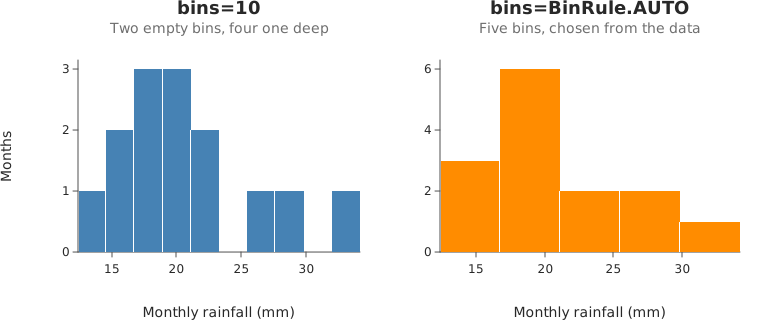
    # Fourteen months of rainfall. A small sample is where a
    # fixed bin count does the most damage: ten bins over
    # fourteen observations leaves two of them empty and makes
    # four more a single observation tall, so the chart shows
    # the gaps between the readings rather than the shape of
    # the distribution.
    var rainfall: List[Float64] = [
        12.4, 15.1, 15.8, 17.2, 18.0, 18.3, 19.1,
        19.6, 20.4, 21.7, 23.0, 25.6, 28.9, 34.2,
    ]

    # The default: a count nobody chose for this sample.
    var fixed = histogram(
        rainfall,
        bins=10,
        theme=Theme(mark_color=STEELBLUE, show_gridlines=False),
        width=380,
        height=320,
        title="bins=10",
        subtitle="Two empty bins, four one deep",
        x_title="Monthly rainfall (mm)",
        y_title="Months",
    )

    # BinRule.AUTO reads the sample and answers 5 -- enough to
    # show the right skew, few enough that every bar stands on
    # more than one reading. Swap in SQRT, STURGES, RICE, SCOTT
    # or FREEDMAN_DIACONIS to see what each rule makes of the
    # same numbers.
    var chosen = histogram(
        rainfall,
        bins=BinRule.AUTO,
        theme=Theme(mark_color=DARKORANGE, show_gridlines=False),
        width=380,
        height=320,
        title="bins=BinRule.AUTO",
        subtitle="Five bins, chosen from the data",
        x_title="Monthly rainfall (mm)",
    )

    save_facets(fixed, chosen, cols=2, path="docs/src/examples/out_histogram_auto.svg")
With a Density Curve
from dataviz import histogram, kdeplot, save_layers
from dataviz import Theme
from dataviz.core.colors import STEELBLUE, CRIMSON
from dataviz.binned.histogram import HistStat
from dataviz import Plot

def main() raises:
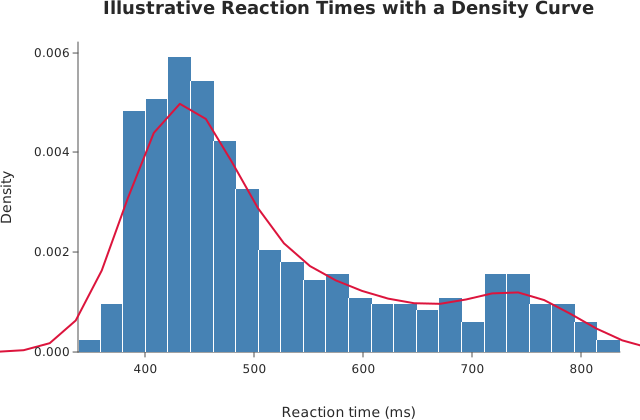
    # Reaction times from a task with a slow tail. The bars and
    # the curve share one numeric x-axis, and HistStat.DENSITY
    # puts the bars on the scale the density curve is on, so
    # the two are directly comparable: where the curve runs
    # above a bar the kernel is smoothing over a gap, where it
    # runs below, a spike.
    var seed = 2024
    var reaction_ms = List[Float64]()
    for _ in range(400):
        var s = 0.0
        for _ in range(3):
            seed = (seed * 1103515245 + 12345) % 2147483648
            s += Float64(seed % 10000) / 10000.0
        # Sum of three uniforms is bell-shaped; cubing the last
        # draw skews a share of them slow.
        seed = (seed * 1103515245 + 12345) % 2147483648
        var u = Float64(seed % 10000) / 10000.0
        reaction_ms.append(320.0 + 60.0 * s + 400.0 * u * u * u)
    var bars = histogram(
        reaction_ms,
        bins=24,
        stat=HistStat.DENSITY,
        theme=Theme(mark_color=STEELBLUE, show_gridlines=False),
        title="Illustrative Reaction Times with a Density Curve",
        x_title="Reaction time (ms)",
        y_title="Density",
    )
    var curve = kdeplot(
        reaction_ms,
        theme=Theme(mark_color=CRIMSON, show_gridlines=False),
    )
    save_layers(bars, curve, path="docs/src/examples/out_histogram_density.svg")
Horizontal
from dataviz import histogram, save
from dataviz import Theme
from dataviz.core.colors import DARKORANGE

def main() raises:
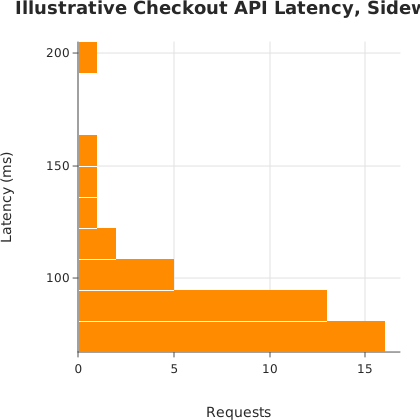
    # The shape a marginal histogram takes beside a joint plot's
    # y-axis: bins up the left edge, counts running right. The
    # same latency sample as the first example.
    var latency_ms: List[Int] = [
        84, 72, 91, 68, 75, 88, 79, 73, 96, 82,
        77, 69, 85, 74, 101, 80, 71, 93, 76, 87,
        83, 70, 78, 89, 81, 95, 67, 86, 72, 90,
        110, 124, 138, 156, 205, 98, 105, 118, 74, 82,
    ]
    var c = histogram(
        latency_ms,
        bins=10,
        horizontal=True,
        theme=Theme(mark_color=DARKORANGE),
        title="Illustrative Checkout API Latency, Sideways",
        x_title="Requests",
        y_title="Latency (ms)",
        width=420,
        height=420,
    )
    save(c, "docs/src/examples/out_histogram_horizontal.svg")
See Data shapes for shared input conventions.
Args:
data: The raw values to bin – not pre-counted; binning happens internally.bins: How many equal-width intervals to dividedata’s own range into. Pass aBinRulein this slot instead to have the count chosen from the data – which is also whathistogram(data)with nobinsdoes (#457) – oredges=for explicit boundaries.weights: One nonnegative weight per observation, or empty (the default) for one apiece – survey weights, dollar amounts, exposure times. A bin then holds the total weight that landed in it.stat: What a bar’s height is:HistStat.COUNT(the default),FREQUENCY,PROBABILITY,PERCENT, orDENSITY. UseDENSITYorFREQUENCYwith unequal-widthedges, where a raw count makes a wide bin look like a tall one.cumulative: Draw each bin as the running total at or below its right edge, turning the chart into an empirical CDF.horizontal: Bins up the y-axis and values running right: the transpose, for a marginal histogram beside a joint plot’s y-axis. Standalone and inrender_facets()only;render_layers()refuses it, since its combined domain has no zero baseline on x.theme: Full styling knobs beyond this function’s own parameters (colors, margins, fonts, gridlines, …) – seeTheme’s docstring.width: Pixel width of the returnedPlot(.size()).height: Pixel height of the returnedPlot(.size()).title: The chart’s title, shown above the plot.subtitle: A secondary line shown under the title.x_title: The x-axis caption.y_title: The y-axis caption.
Related
Related charts: Box Plot
Relevant API: histogram