Letter-Value Plot
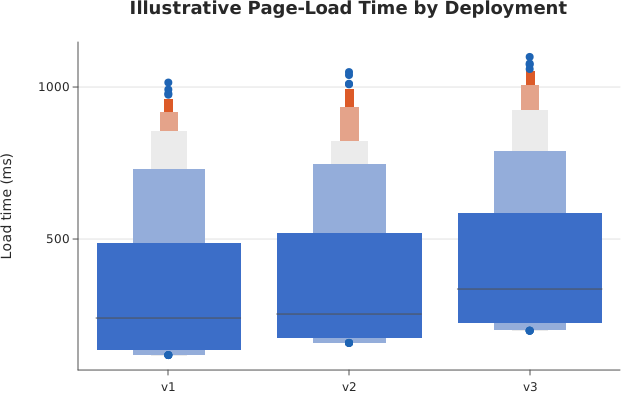
boxenplot() over a long-form dataframe_mojo DataFrame (#743): one row per observation, with category naming each row’s group and value holding the number.
Usage
from dataviz import boxenplot, save

def main() raises:
    # Illustrative page-load times (ms) for three deployments, 256
    # samples each with a long right tail -- the case a box plot's
    # outlier cloud says nothing useful about.
    var names: List[String] = ["v1", "v2", "v3"]
    var samples = List[List[Float64]]()
    for d in range(3):
        var s = List[Float64]()
        var seed = 7 + d
        for _ in range(256):
            seed = (seed * 1103515245 + 12345) % 2147483648
            var u = Float64(seed % 10000) / 10000.0
            # Skewed: most loads are quick, a few are very slow.
            s.append(120.0 + 40.0 * Float64(d) + 900.0 * u * u * u)
        samples.append(s^)
    var chart = boxenplot(
        names,
        samples,
        title="Illustrative Page-Load Time by Deployment",
        y_title="Load time (ms)",
    )
    save(chart, "docs/src/examples/out_boxenplot.svg")
See Data shapes for shared input conventions.
Args:
df: The frame to read.category: The string column naming each observation’s group.value: The numeric column holding the observations.theme: Full styling knobs beyond this function’s own parameters.width: Pixel width of the returnedPlot(.size()).height: Pixel height of the returnedPlot(.size()).title: The chart’s title, shown above the plot.subtitle: A line under the title.x_title: The x-axis caption; defaults tocategory.y_title: The y-axis caption; defaults tovalue.horizontal: Draw the categories down the y axis instead.
Related
Related charts: Box Plot · Violin
Relevant API: boxenplot