Estimate Line
lineplot() over named columns of a dataframe_mojo DataFrame (#743). Each argument names a column instead of holding the values. The axis titles default to the x and y column names.
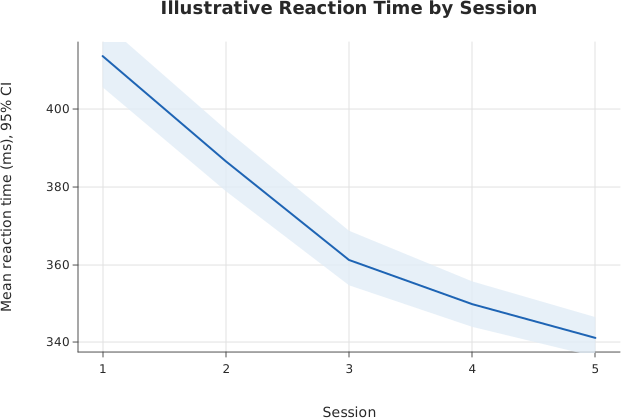
Usage
from dataviz import lineplot, save

def main() raises:
    # Illustrative reaction time (ms) across five sessions, three
    # trials per session per participant. Each session's readings
    # collapse to a mean with its bootstrap 95% confidence band.
    var session = List[Float64]()
    var reaction = List[Float64]()
    var trials: List[List[Float64]] = [
        [412.0, 398.0, 431.0, 405.0, 420.0, 415.0],
        [388.0, 371.0, 402.0, 379.0, 395.0, 384.0],
        [362.0, 349.0, 377.0, 358.0, 366.0, 355.0],
        [351.0, 338.0, 360.0, 344.0, 357.0, 349.0],
        [340.0, 333.0, 352.0, 339.0, 347.0, 336.0],
    ]
    for s in range(len(trials)):
        for v in trials[s]:
            session.append(Float64(s + 1))
            reaction.append(v)
    var chart = lineplot(
        session,
        reaction,
        title="Illustrative Reaction Time by Session",
        x_title="Session",
        y_title="Mean reaction time (ms), 95% CI",
    )
    save(chart, "docs/src/examples/out_lineplot.svg")
See Data shapes for shared input conventions.
Args:
df: The frame to read.x: The numeric column for this channel.y: The numeric column for this channel.estimator: See the list overload.errorbar: See the list overload.seed: See the list overload.theme: See the list overload.width: See the list overload.height: See the list overload.title: See the list overload.subtitle: See the list overload.x_title: See the list overload.y_title: See the list overload.
Related
Related charts: Estimate Bars · Estimate Points
Relevant API: lineplot