Line
line() over named columns of a dataframe_mojo DataFrame (#364); the axis titles default to the column names.

Usage
from dataviz import line
from dataviz import save
from dataviz.core.colors import BROWN
from dataviz import Theme

def main() raises:
    # Illustrative monthly active users after a product launch:
    # sustained growth with a summer plateau and year-end lift.
    var month: List[Float64] = [
        1, 2, 3, 4, 5, 6, 7, 8, 9, 10, 11, 12,
        13, 14, 15, 16, 17, 18, 19, 20, 21, 22, 23, 24,
    ]
    var active_users_k: List[Float64] = [
        18, 24, 31, 39, 48, 57, 63, 66, 68, 74, 83, 96,
        104, 113, 125, 138, 149, 156, 158, 164, 177, 193, 214, 238,
    ]

    var c = line(
        month,
        active_users_k,
        title="Illustrative Monthly Active Users After Launch",
        x_title="Month since launch",
        y_title="Active users (thousands)",
        theme=Theme(
            mark_color=BROWN,
            line_width=3.0,
            show_gridlines=False,
        ),
    )
    save(c, "docs/src/examples/out_line.svg")
Slope Chart

from dataviz import line
from dataviz import save
from dataviz import Theme
from dataviz.core.colors import SEAGREEN

def main() raises:
    # x=0.0 ("2023"), x=1.0 ("2024") -- revenue, in millions.
    var x: List[Float64] = [0.0, 1.0]
    var revenue: List[Float64] = [42.0, 61.0]

    var c = line(
        x,
        revenue,
        title="Revenue, 2023 to 2024",
        x_title="Year",
        y_title="Revenue ($M)",
        theme=Theme(
            mark_color=SEAGREEN,
            line_width=3.0,
            show_gridlines=False,
        ),
        width=320,
        height=420,
    )
    save(c, "docs/src/examples/out_slope.svg")
Step Chart
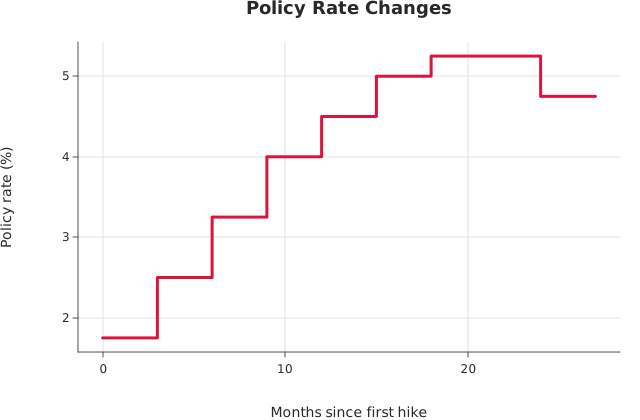
from dataviz import StepStyle, line
from dataviz import save
from dataviz.core.colors import CRIMSON
from dataviz import Theme

def main() raises:
    # A central bank's policy rate holds flat between meetings and
    # moves only at one, so the straight interpolation a plain line
    # draws would show months of gradual drift that never happened.
    # StepStyle.POST puts the riser at the later month: the rate set
    # at a meeting is the rate in force until the next one.
    var month: List[Float64] = [
        0.0, 3.0, 6.0, 9.0, 12.0, 15.0, 18.0, 21.0, 24.0, 27.0
    ]
    var rate: List[Float64] = [
        1.75, 2.5, 3.25, 4.0, 4.5, 5.0, 5.25, 5.25, 4.75, 4.75
    ]

    var c = line(
        month,
        rate,
        step=StepStyle.POST,
        title="Policy Rate Changes",
        theme=Theme(mark_color=CRIMSON, line_width=3.0),
        x_title="Months since first hike",
        y_title="Policy rate (%)",
    )
    save(c, "docs/src/examples/out_step.svg")
Time Axis
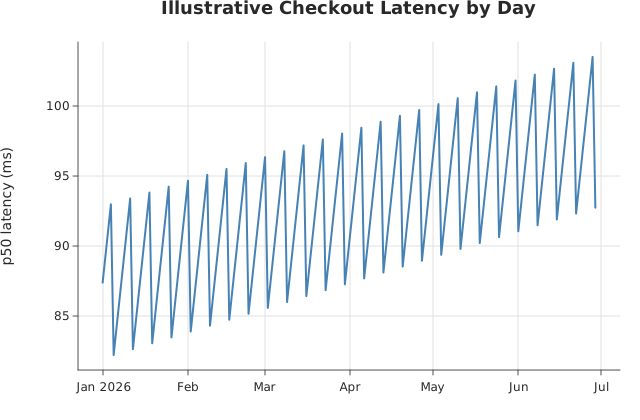
from morrow import Morrow

from dataviz import line, save
from dataviz import Theme
from dataviz.core.colors import STEELBLUE

def main() raises:
    # Six months of daily readings. Before #195 this axis read
    # 20454, 20504, 20554 -- epoch day counts -- because the
    # only way to plot a date was to convert it by hand. Now the
    # ticks land on month starts, which is where a reader of a
    # six-month series looks.
    var day = List[Morrow]()
    var latency_ms = List[Float64]()
    var start = Morrow.get(2026, 1, 1)
    for i in range(180):
        day.append(start.shift(days=i))
        # A slow upward drift with a weekly cycle on top.
        var weekday = Float64((i + 3) % 7)
        latency_ms.append(
            82.0 + Float64(i) * 0.06 + weekday * 1.8
        )
    var c = line(
        day,
        latency_ms,
        title="Illustrative Checkout Latency by Day",
        theme=Theme(mark_color=STEELBLUE),
        y_title="p50 latency (ms)",
    )
    save(c, "docs/src/examples/out_line_time.svg")
See Data shapes for shared input conventions.
Args:
df: The frame to read.x: The numeric column for the x axis.y: The numeric column for the y axis.step: Step (stairs) interpolation; see the numeric overload.theme: Full styling knobs beyond this function’s own parameters.width: Pixel width of the returnedPlot(.size()).height: Pixel height of the returnedPlot(.size()).title: The chart’s title, shown above the plot.x_title: The x-axis caption; defaults tox.y_title: The y-axis caption; defaults toy.
Related
Related charts: Scatter · Area
Relevant API: line