Event Plot
One row of tick marks per series, each tick at the position of one event: a raster plot.
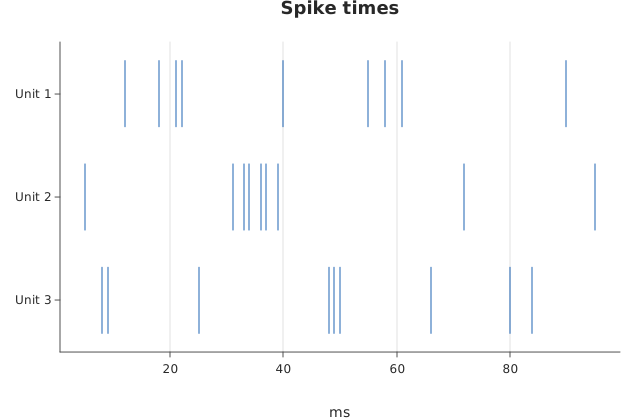
Usage
from dataviz import eventplot
from dataviz import save

def main() raises:
    var neurons: List[String] = ["Unit 1", "Unit 2", "Unit 3"]
    var spikes: List[List[Float64]] = [
        [12.0, 18.0, 21.0, 22.0, 40.0, 55.0, 58.0, 61.0, 90.0],
        [5.0, 31.0, 33.0, 34.0, 36.0, 37.0, 39.0, 72.0, 95.0],
        [8.0, 9.0, 25.0, 48.0, 49.0, 50.0, 66.0, 80.0, 84.0],
    ]
    var c = eventplot(
        neurons,
        spikes,
        line_length=0.8,
        title="Spike times",
        x_title="ms",
    )
    save(c, "docs/src/examples/out_eventplot.svg")
See Data shapes for shared input conventions.
Args:
labels: One row label per series, top to bottom.positions: Each row’s event positions (positions[i]), in the same units as the shared x-axis. Any row may be empty; at least one event must exist overall.line_length: Each tick’s height as a fraction of its row’s band, defaulting to1.0(the full band). Below 1.0 opens a gap between rows, which is what makes two dense rows readable as two rows.theme: Colors, sizes and spacing.width: Canvas width in pixels.height: Canvas height in pixels.title: Chart title.subtitle: Smaller line under the title.x_title: X-axis label.y_title: Y-axis label.
Related
Related charts: ECDF · 2D Histogram
Relevant API: eventplot