Hexagonal Bins
hexbin() over named columns of a dataframe_mojo DataFrame (#743). Each argument names a column instead of holding the values. The axis titles default to the x and y column names.
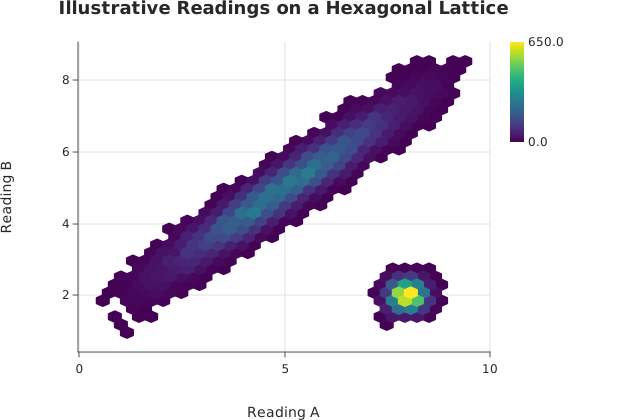
Usage
from dataviz import hexbin, save
from dataviz import Theme
from dataviz.core.colormaps import viridis

def main() raises:
    # Twenty thousand readings along a diagonal ridge with a
    # second, tighter cluster -- the shape a rectangular grid
    # turns into a staircase. A small linear congruential
    # generator keeps the example self-contained.
    var seed = 4321
    var xs = List[Float64]()
    var ys = List[Float64]()
    for i in range(20000):
        var u = List[Float64]()
        for _ in range(6):
            seed = (seed * 1103515245 + 12345) % 2147483648
            u.append(Float64(seed % 10000) / 10000.0 - 0.5)
        var gx = u[0] + u[1] + u[2]
        var gy = u[3] + u[4] + u[5]
        if i % 4 == 0:
            xs.append(8.0 + 0.5 * gx)
            ys.append(2.0 + 0.5 * gy)
        else:
            var along = 3.0 * gx
            xs.append(5.0 + along + 0.4 * gy)
            ys.append(5.0 + 0.8 * along - 0.4 * gy)
    var chart = hexbin(
        xs,
        ys,
        gridsize=30,
        theme=Theme(color_ramp=viridis()),
        title="Illustrative Readings on a Hexagonal Lattice",
        x_title="Reading A",
        y_title="Reading B",
    )
    save(chart, "docs/src/examples/out_hexbin.svg")
See Data shapes for shared input conventions.
Args:
df: The frame to read.x: The numeric column for this channel.y: The numeric column for this channel.gridsize: See the list overload.theme: See the list overload.width: See the list overload.height: See the list overload.title: See the list overload.subtitle: See the list overload.x_title: See the list overload.y_title: See the list overload.
Related
Related charts: 2D Histogram
Relevant API: hexbin