Joint Plot
Make a jointplot from two named numeric DataFrame columns (#743).
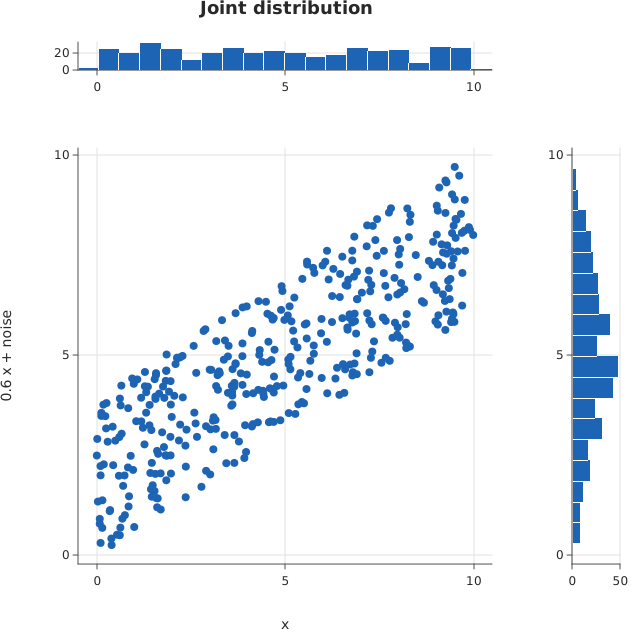
Usage
from dataviz import jointplot, save

def main() raises:
    # A correlated pair from a fixed linear congruential sequence,
    # so the figure is the same on every run.
    var x = List[Float64]()
    var y = List[Float64]()
    var seed = 20260913
    for _ in range(400):
        seed = (seed * 1103515245 + 12345) % 2147483648
        var a = Float64(seed % 10000) / 1000.0
        seed = (seed * 1103515245 + 12345) % 2147483648
        var b = Float64(seed % 10000) / 1000.0
        x.append(a)
        y.append(a * 0.6 + b * 0.4)
    var c = jointplot(
        x,
        y,
        title="Joint distribution",
        x_title="x",
        y_title="0.6 x + noise",
    )
    save(c, "docs/src/examples/out_jointplot.svg")
See Data shapes for shared input conventions.
Args:
df: The frame containing both variables.x: Name of the horizontal numeric column.y: Name of the vertical numeric column.theme: Figure styling and missing-value policy.width: Figure width in pixels.height: Figure height in pixels.bins: Number of marginal histogram bins.ratio: Main panel size relative to its marginals.title: Figure title.x_title: Horizontal title, defaulting tox.y_title: Vertical title, defaulting toy.
Related
Related charts: Residual Plot · Pair Plot
Relevant API: jointplot