Image
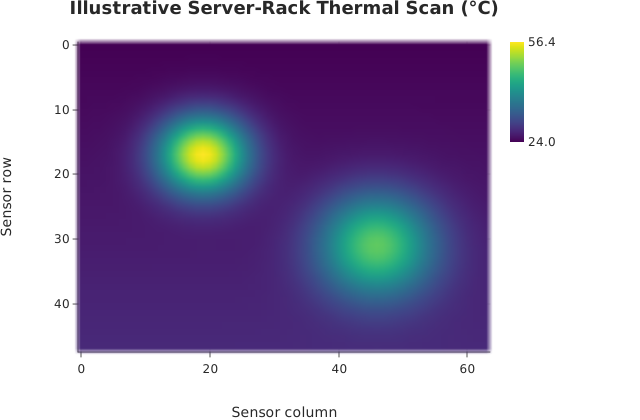
imshow() over a long-form dataframe_mojo DataFrame (#743): one row per cell, with row and column giving the cell’s coordinates and value its height.
Usage
from std.math import exp

from dataviz import imshow
from dataviz.core.colormaps import viridis
from dataviz import save
from dataviz import Theme

def main() raises:
    # Illustrative thermal-camera readings across a server rack.
    # Two hot components sit on top of a gentle exhaust gradient.
    var z = List[List[Float64]]()
    for r in range(48):
        var row = List[Float64]()
        for c in range(64):
            var dx1 = (Float64(c) - 19.0) / 7.0
            var dy1 = (Float64(r) - 17.0) / 6.0
            var dx2 = (Float64(c) - 46.0) / 9.0
            var dy2 = (Float64(r) - 31.0) / 8.0
            var temperature = 24.0 + Float64(r) * 0.08
            temperature += 31.0 * exp(-(dx1 * dx1 + dy1 * dy1))
            temperature += 22.0 * exp(-(dx2 * dx2 + dy2 * dy2))
            row.append(temperature)
        z.append(row^)

    var chart = imshow(
        z,
        theme=Theme(color_ramp=viridis()),
        title="Illustrative Server-Rack Thermal Scan (°C)",
        x_title="Sensor column",
        y_title="Sensor row",
    )
    save(chart, "docs/src/examples/out_imshow.svg")
See Data shapes for shared input conventions.
Args:
df: The frame to read.row: The numeric column giving each cell’s row coordinate.column: The numeric column giving each cell’s column coordinate.value: The numeric column holding each cell.theme: Full styling knobs beyond this function’s own parameters.width: Pixel width of the returnedPlot(.size()).height: Pixel height of the returnedPlot(.size()).title: The chart’s title, shown above the plot.subtitle: A line under the title.x_title: The x-axis caption; defaults tocolumn.y_title: The y-axis caption; defaults torow.
Related
Related charts: Heatmap · Quadrilateral Mesh
Relevant API: imshow