Arrow Annotation
Arrow Annotation
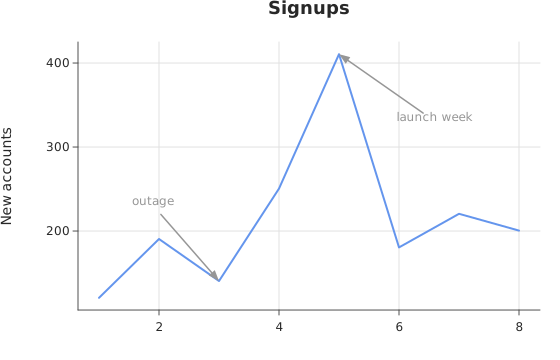
Use this when: You need to point to a data position while placing its label in open space.
Usage
from dataviz.core.colors import CORNFLOWERBLUE
from dataviz import Plot, save
from dataviz.core.theme import Theme


def main() raises:
    var month: List[Float64] = [1.0, 2.0, 3.0, 4.0, 5.0, 6.0, 7.0, 8.0]
    var signups: List[Float64] = [
        120.0,
        190.0,
        140.0,
        250.0,
        410.0,
        180.0,
        220.0,
        200.0,
    ]

    var plot = (
        Plot()
        .mark_line()
        .encode(x=month, y=signups)
        .size(560, 360)
        .labels(title="Signups", y_title="New accounts")
        .theme(Theme(mark_color=CORNFLOWERBLUE))
        .annotate_arrow(5.0, 410.0, "launch week", 6.6, 330.0)
        .annotate_arrow(3.0, 140.0, "outage", 1.9, 230.0)
    )
    save(plot, "docs/src/examples/out_annotate_arrow.svg")
Related
Related recipes: Point Marker · Annotation Colors
Relevant API: Plot annotations