Workflow: Grouped Estimates with Their Sample Counts
Workflow: Grouped Estimates with Their Sample Counts
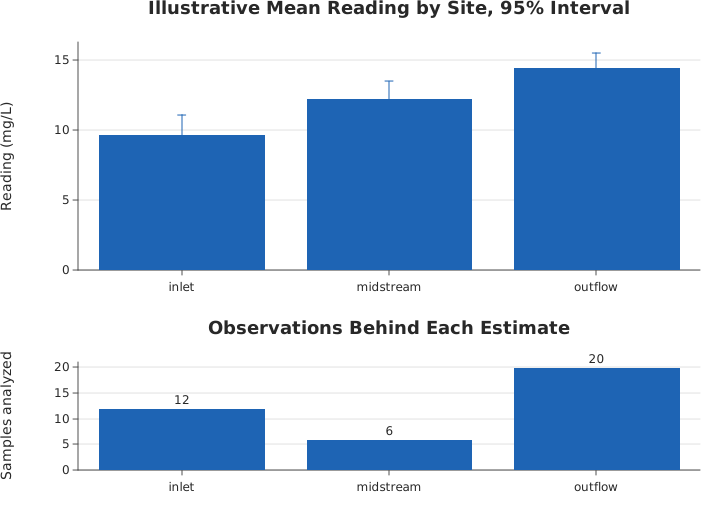
Use this when: You need to compare a mean per group with its confidence interval, say how many observations each estimate rests on, and state what happened to the rows that were incomplete.
Usage
from dataviz.chart import AnyChart
from dataviz import GridCell, Plot, barplot
from dataviz.core.theme import Theme
from dataviz.core.stats import ErrorBar, Estimator
from dataviz.layout import save_grid
from std.utils.numerics import nan


def main() raises:
    # Illustrative assay readings: four sites, one row per sample.
    # "harbour" was sampled but every reading failed quality control,
    # which is a different thing from never having been sampled.
    var site = List[String]()
    var reading = List[Float64]()
    var seed = 20260921

    var names: List[String] = ["inlet", "midstream", "outflow", "harbour"]
    var per_site: List[Int] = [12, 7, 20, 4]
    for s in range(len(names)):
        for i in range(per_site[s]):
            site.append(names[s])
            if names[s] == "harbour":
                reading.append(nan[DType.float64]())
                continue
            # Every fourth midstream sample failed QC.
            if names[s] == "midstream" and i % 4 == 3:
                reading.append(nan[DType.float64]())
                continue
            seed = (seed * 1103515245 + 12345) % 2147483648
            var wobble = Float64(seed % 900) / 100.0
            reading.append(6.0 + Float64(s) * 2.0 + wobble)

    var estimates = barplot(
        site,
        reading,
        estimator=Estimator.MEAN,
        errorbar=ErrorBar.ci(0.95),
        title="Illustrative Mean Reading by Site, 95% Interval",
        y_title="Reading (mg/L)",
        width=720,
        height=300,
    )
    # The counts are the point of this panel, so each bar prints its
    # own: a reader should not have to measure a bar against an axis to
    # learn that an estimate rests on five observations.
    var counts = barplot(
        site,
        reading,
        estimator=Estimator.COUNT,
        theme=Theme(show_data_labels=True),
        title="Observations Behind Each Estimate",
        y_title="Samples analyzed",
        width=720,
        height=220,
    )

    var path = "docs/src/examples/out_workflow_grouped_estimates.svg"
    var panels: List[AnyChart] = [AnyChart(estimates), AnyChart(counts)]
    var cells: List[GridCell] = [GridCell(0, 0), GridCell(1, 0)]
    # The counts panel is shorter: it carries one number per group, and
    # the estimates are what a reader spends time on.
    var rows: List[Float64] = [1.6, 1.0]
    save_grid(panels, cells, 720, 520, path, row_weights=rows)

    var f = open(path, "r")
    var svg = f.read()
    f.close()

    # The sites with readings appear; the one with none does not, in
    # either panel. A zero-height bar would read as "we measured zero".
    for name in ["inlet", "midstream", "outflow"]:
        if ">" + name + "</text>" not in svg:
            raise Error("a sampled site is missing from the chart: " + name)
    if "harbour" in svg:
        raise Error(
            "harbour has no usable readings and must not be drawn as an"
            " estimate of zero"
        )

    # The counts panel shows the effective sample sizes: inlet 12,
    # midstream 7 minus its 2 failures, outflow 20.
    for label in [">12<", ">5<", ">20<"]:
        if label not in svg:
            raise Error(
                "the counts panel does not show the present-observation count "
                + label
            )

    print(
        "grouped estimates: 43 rows,",
        "3 sites with usable readings, counts 12/5/20",
    )
Related
Related recipes: Workflow: A Time Series with an Outage · Workflow: Comparing Distributions
Relevant API: Data shapes