Compact Axis Chrome
Compact Axis Chrome
Use this when: You need to shorten ticks and label gaps to preserve space in a compact chart.
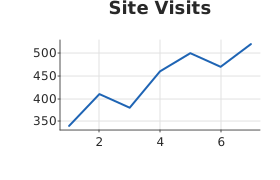
Usage
from dataviz import Plot, save
from dataviz.core.theme import Theme


def main() raises:
    var days: List[Float64] = [1.0, 2.0, 3.0, 4.0, 5.0, 6.0, 7.0]
    var visits: List[Float64] = [
        340.0,
        410.0,
        380.0,
        460.0,
        500.0,
        470.0,
        520.0,
    ]

    var plot = (
        Plot()
        .size(280, 180)
        .mark_line()
        .encode(x=days, y=visits)
        .labels(title="Site Visits")
        .theme(Theme(tick_length=2, label_gap=2))
    )
    save(plot, "docs/src/examples/out_compact_axis_chrome.svg")
Related
Related recipes: Bar Zero Baseline · Custom Margins