Workflow: A Publication Figure
Workflow: A Publication Figure
Use this when: You need to assemble a multi-panel figure at an exact physical size, with two maps on one shared color scale and axis labels written as math.
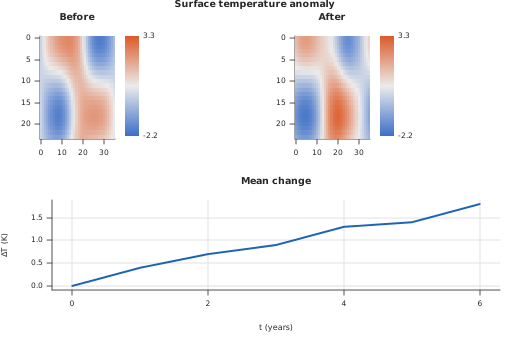
Usage
from std.math import cos, exp, sin

from dataviz.chart import AnyChart
from dataviz import GridCell, Plot, Theme, imshow, line, save_grid


def _field(rows: Int, cols: Int, shift: Float64) -> List[List[Float64]]:
    """A smooth synthetic temperature anomaly on a grid, displaced by
    `shift` -- deterministic, so the figure is the same on every run."""
    var out = List[List[Float64]]()
    for r in range(rows):
        var row = List[Float64]()
        for c in range(cols):
            var x = Float64(c) / Float64(cols - 1) * 6.0
            var y = Float64(r) / Float64(rows - 1) * 4.0
            row.append(
                2.0 * sin(x + shift) * cos(y) + 1.5 * exp(-((x - 3.0) ** 2))
            )
        out.append(row^)
    return out^


def _points(mm: Float64) -> Int:
    """Millimeters to the figure's layout unit, points (1/72 inch)."""
    return Int(mm / 25.4 * 72.0 + 0.5)


def main() raises:
    var before = _field(24, 36, 0.0)
    var after = _field(24, 36, 0.8)

    # One color domain over both maps, so a color means the same value in
    # each. Check it covers every value: a value outside the domain would
    # be clamped to the end color and read as something it is not.
    var lo = before[0][0]
    var hi = before[0][0]
    for field in [before.copy(), after.copy()]:
        for row in field:
            for v in row:
                lo = min(lo, v)
                hi = max(hi, v)
    var shared_lo = lo - 0.05 * (hi - lo)
    var shared_hi = hi + 0.05 * (hi - lo)
    if not (shared_lo <= lo and shared_hi >= hi):
        raise Error("the shared color domain does not cover the data")

    # Type sized for print. At 180 mm the default on-screen sizes are
    # too large for three panels: small panels then crowd their tick
    # labels, which the library does not yet thin out on its own (#727).
    # The margins shrink with it -- the defaults are sized for a
    # 640-point chart and would take most of a small panel.
    var print_type = Theme(
        font_size=7.5,
        title_font_size=9.5,
        axis_title_font_size=8.0,
        margin_left=40,
        margin_right=10,
        margin_top=10,
        margin_bottom=30,
    )
    var left = imshow(
        before, theme=print_type, title="Before"
    ).scale_color_domain(shared_lo, shared_hi)
    var right = imshow(
        after, theme=print_type, title="After"
    ).scale_color_domain(shared_lo, shared_hi)
    var t: List[Float64] = [0.0, 1.0, 2.0, 3.0, 4.0, 5.0, 6.0]
    var mean_change: List[Float64] = [0.0, 0.4, 0.7, 0.9, 1.3, 1.4, 1.8]
    var trend = line(
        t,
        mean_change,
        theme=print_type,
        title="Mean change",
        x_title="$t$ (years)",
        y_title="$\\Delta T$ (K)",
    )

    var plots: List[AnyChart] = [
        AnyChart(left),
        AnyChart(right),
        AnyChart(trend),
    ]
    var cells: List[GridCell] = [
        GridCell(0, 0),
        GridCell(0, 1),
        GridCell(1, 0, col_span=2),
    ]
    var rows: List[Float64] = [1.0, 1.0]
    # A two-column journal figure: 180 mm wide, 120 mm tall.
    var width = _points(180.0)
    var height = _points(120.0)
    var path = "docs/src/examples/out_workflow_publication_figure.svg"
    save_grid(
        plots,
        cells,
        width,
        height,
        path,
        row_weights=rows,
        title="Surface temperature anomaly",
    )

    # The saved document's own size is what a journal's system reads.
    var f = open(path, "r")
    var svg = f.read()
    f.close()
    var root = String(svg[byte = 0 : svg.find(">")])
    if (
        'width="' + String(width) + '"' not in root
        or 'height="' + String(height) + '"' not in root
    ):
        raise Error("the figure was not saved at 180 x 120 mm: " + root)
Related
Related recipes: Workflow: A Scatter with Marginals
Relevant API: Data shapes