One Color Scale Across Two Charts
One Color Scale Across Two Charts
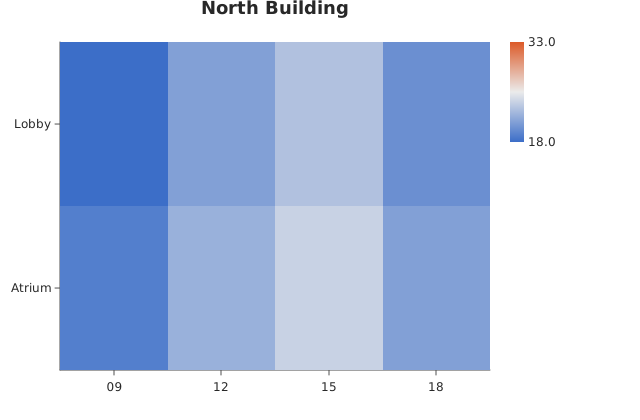
Use this when: You need to color two charts against the same limits so their shades mean the same number, using shared_color_domain() to pool the values and scale_color_domain() to pin each chart to the result.
Usage
from dataviz.core.color_scale import shared_color_domain
from dataviz.grid.heatmap import heatmap
from dataviz import save


def main() raises:
    var rooms: List[String] = [
        "Lobby",
        "Lobby",
        "Lobby",
        "Lobby",
        "Atrium",
        "Atrium",
        "Atrium",
        "Atrium",
    ]
    var slots: List[String] = [
        "09",
        "12",
        "15",
        "18",
        "09",
        "12",
        "15",
        "18",
    ]
    # Two buildings measured the same way, but one runs much warmer.
    var north: List[Float64] = [
        18.0,
        21.0,
        23.0,
        20.0,
        19.0,
        22.0,
        24.0,
        21.0,
    ]
    var south: List[Float64] = [
        21.0,
        27.0,
        31.0,
        26.0,
        22.0,
        28.0,
        33.0,
        27.0,
    ]

    # Each chart would otherwise color against its own min and max, so
    # the warmest cell in each would be painted the same shade -- 24 in
    # one building and 33 in the other, looking identical. Pooling the
    # values first gives both charts one answer.
    var limits = shared_color_domain([north.copy(), south.copy()])

    var left = heatmap(
        slots, rooms, north, title="North Building"
    ).scale_color_domain(limits.min, limits.max)
    var right = heatmap(
        slots, rooms, south, title="South Building"
    ).scale_color_domain(limits.min, limits.max)

    save(left, "docs/src/examples/out_shared_color_domain_north.svg")
    save(right, "docs/src/examples/out_shared_color_domain_south.svg")
Related
Related recipes: Center a Diverging Scale on Zero · One Color Per Category Across Two Charts