Bar-and-Line Combo
Bar-and-Line Combo
Use this when: You need to overlay a target/average line directly on a bar chart with render_layers().
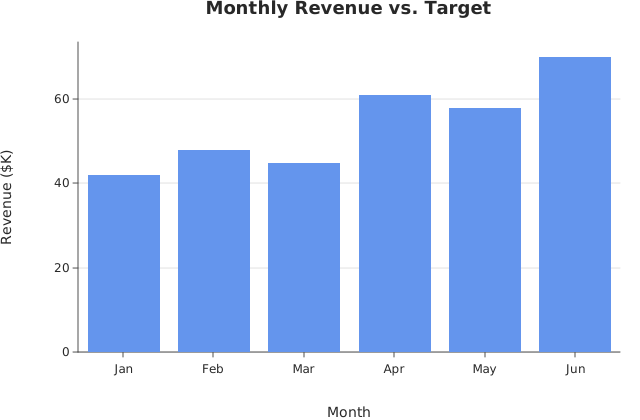
Usage
from dataviz.chart import AnyChart
from dataviz import Plot, save_layers
from dataviz.core.colors import CORNFLOWERBLUE, TOMATO
from dataviz.core.theme import Theme


def main() raises:
    var months: List[String] = ["Jan", "Feb", "Mar", "Apr", "May", "Jun"]
    var revenue: List[Float64] = [42.0, 48.0, 45.0, 61.0, 58.0, 70.0]
    # The line layer's own x values are never read against a
    # categorical axis -- only length matters, so a plain 0..N-1 index
    # column is the natural choice (see render_layers()'s own
    # docstring for the "aligned by position, not by x" contract).
    var index: List[Float64] = [0.0, 1.0, 2.0, 3.0, 4.0, 5.0]
    var target: List[Float64] = [50.0, 50.0, 50.0, 55.0, 55.0, 55.0]

    var bars = (
        Plot()
        .mark_bar()
        .encode_categorical(x=months, y=revenue)
        .theme(Theme(mark_color=CORNFLOWERBLUE))
        .labels(
            title="Monthly Revenue vs. Target",
            x_title="Month",
            y_title="Revenue ($K)",
        )
    )
    var target_line = (
        Plot()
        .mark_line()
        .encode(x=index, y=target)
        .theme(Theme(mark_color=TOMATO, line_width=2.0))
    )
    var plots: List[AnyChart] = [AnyChart(bars), AnyChart(target_line)]
    save_layers(plots, "docs/src/examples/out_bar_line_combo.svg")
Related
Related recipes: Combo Chart (Shared Axis) · Dual Y-Axis
Relevant API: Rendering and composition