Indexed-to-100 Comparison
Indexed-to-100 Comparison
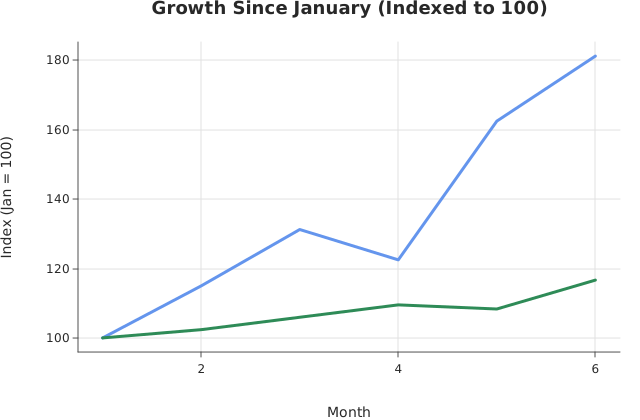
Use this when: You need to index each series to its own first value so two series on different scales become directly comparable.
Usage
from dataviz.chart import AnyChart
from dataviz import Plot, save_layers
from dataviz.core.colors import CORNFLOWERBLUE, SEAGREEN
from dataviz.core.theme import Theme


def main() raises:
    var months: List[Float64] = [1.0, 2.0, 3.0, 4.0, 5.0, 6.0]
    var product_a: List[Float64] = [80.0, 92.0, 105.0, 98.0, 130.0, 145.0]
    var product_b: List[Float64] = [
        4200.0,
        4300.0,
        4450.0,
        4600.0,
        4550.0,
        4900.0,
    ]

    # Index each series to its own first value * 100 so two series
    # on very different scales become directly comparable growth
    # curves.
    var index_a = List[Float64]()
    for v in product_a:
        index_a.append(v / product_a[0] * 100.0)
    var index_b = List[Float64]()
    for v in product_b:
        index_b.append(v / product_b[0] * 100.0)

    var layer_a = (
        Plot()
        .mark_line()
        .encode(x=months, y=index_a)
        .theme(Theme(mark_color=CORNFLOWERBLUE, line_width=3.0))
        .labels(
            title="Growth Since January (Indexed to 100)",
            x_title="Month",
            y_title="Index (Jan = 100)",
        )
    )
    var layer_b = (
        Plot()
        .mark_line()
        .encode(x=months, y=index_b)
        .theme(Theme(mark_color=SEAGREEN, line_width=3.0))
    )
    var plots: List[AnyChart] = [AnyChart(layer_a), AnyChart(layer_b)]
    save_layers(plots, "docs/src/examples/out_layers_indexed.svg")
Related
Related recipes: Log Scale (Y-Axis) · Percent Stacked Bar