Center a Diverging Scale on Zero
Center a Diverging Scale on Zero
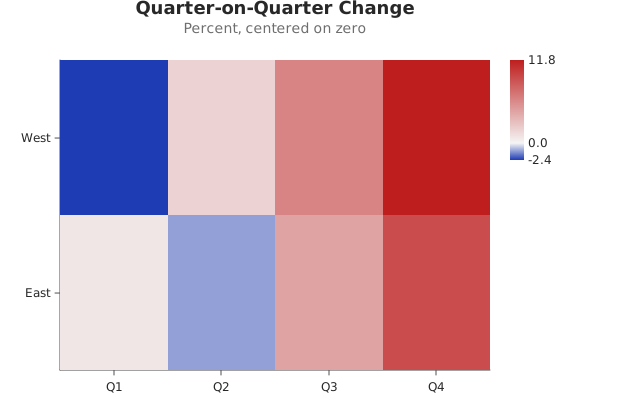
Use this when: You need to put a diverging ramp’s neutral color on zero rather than on the midpoint of the data, so positive and negative read as opposite even when the data is lopsided.
Usage
from canvas.color import Color
from dataviz.grid.heatmap import heatmap
from dataviz import save
from dataviz.core.theme import Theme


def main() raises:
    var quarters: List[String] = [
        "Q1",
        "Q2",
        "Q3",
        "Q4",
        "Q1",
        "Q2",
        "Q3",
        "Q4",
    ]
    var regions: List[String] = [
        "West",
        "West",
        "West",
        "West",
        "East",
        "East",
        "East",
        "East",
    ]
    # Mostly growth, with two small contractions: the data runs from
    # -2.4 to +11.8, so its midpoint is +4.7.
    var change: List[Float64] = [
        -2.4,
        1.9,
        6.2,
        11.8,
        0.8,
        -1.1,
        4.5,
        9.3,
    ]

    var plot = heatmap(
        quarters,
        regions,
        change,
        theme=Theme(
            color_scale_low=Color(30, 60, 180),
            color_scale_mid=Color(245, 245, 245),
            color_scale_high=Color(190, 30, 30),
        ),
        title="Quarter-on-Quarter Change",
        subtitle="Percent, centered on zero",
        # Without this the neutral white lands on +4.7, so a quarter
        # that grew 3% would be painted in the color that is supposed
        # to mean "shrank". Centering leaves the two ends alone and
        # lets the arms be different sizes, which is the honest
        # picture when the data is not symmetric.
    ).scale_color_center(0.0)

    save(plot, "docs/src/examples/out_centered_diverging_scale.svg")
Related
Related recipes: Custom Diverging Colors · One Color Scale Across Two Charts