Step Interpolation
Step Interpolation
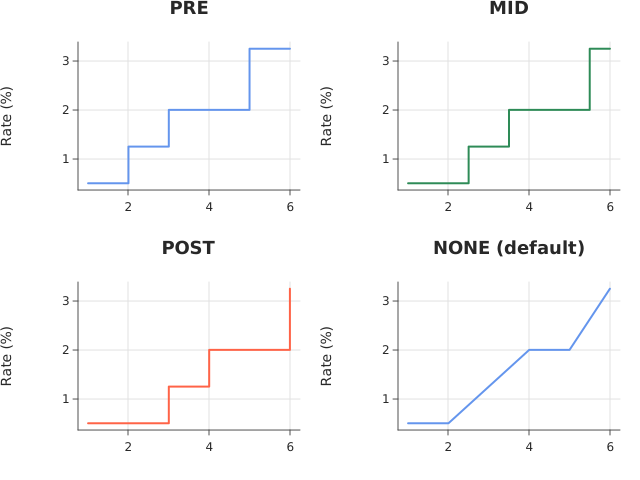
Use this when: You need to draw values that remain constant between samples as a staircase.
Usage
from dataviz.chart import AnyChart
from dataviz.core.colors import CORNFLOWERBLUE, SEAGREEN, TOMATO
from dataviz import Plot, save_facets, StepStyle
from dataviz.core.theme import Theme


def main() raises:
    # A central-bank policy rate: it holds flat between meetings and
    # moves only on the day of a decision, which is exactly the shape a
    # straight interpolation misrepresents.
    var meeting: List[Float64] = [1.0, 2.0, 3.0, 4.0, 5.0, 6.0]
    var rate: List[Float64] = [0.5, 0.5, 1.25, 2.0, 2.0, 3.25]

    var pre = (
        Plot()
        .size(320, 240)
        .mark_line(step=StepStyle.PRE)
        .encode(x=meeting, y=rate)
        .labels(title="PRE", y_title="Rate (%)")
        .theme(Theme(mark_color=CORNFLOWERBLUE))
    )
    var mid = (
        Plot()
        .size(320, 240)
        .mark_line(step=StepStyle.MID)
        .encode(x=meeting, y=rate)
        .labels(title="MID", y_title="Rate (%)")
        .theme(Theme(mark_color=SEAGREEN))
    )
    var post = (
        Plot()
        .size(320, 240)
        .mark_line(step=StepStyle.POST)
        .encode(x=meeting, y=rate)
        .labels(title="POST", y_title="Rate (%)")
        .theme(Theme(mark_color=TOMATO))
    )
    # NONE is the default straight interpolation, shown alongside so the
    # difference is visible rather than asserted.
    var none = (
        Plot()
        .size(320, 240)
        .mark_line()
        .encode(x=meeting, y=rate)
        .labels(title="NONE (default)", y_title="Rate (%)")
        .theme(Theme(mark_color=CORNFLOWERBLUE))
    )

    var plots: List[AnyChart] = [
        AnyChart(pre),
        AnyChart(mid),
        AnyChart(post),
        AnyChart(none),
    ]
    save_facets(plots, 2, "docs/src/examples/out_step_interpolation.svg")
Related
Related recipes: Percent Stacked Bar · Sorted Bars