Scale Violin Width by Count
Scale Violin Width by Count
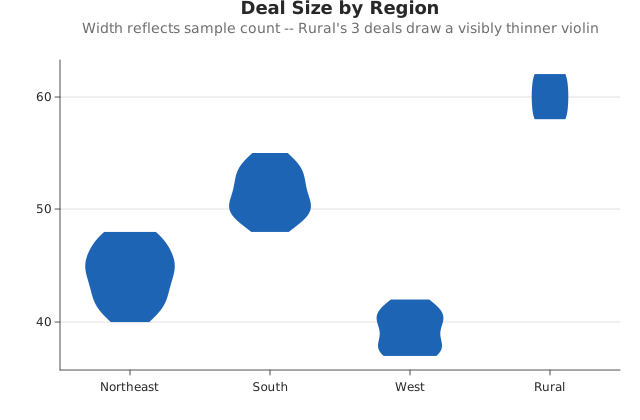
Use this when: You need to scale violin width by sample count instead of equalizing every category.
Usage
from dataviz import save, violin


def main() raises:
    var regions: List[String] = ["Northeast", "South", "West", "Rural"]
    var deal_sizes: List[List[Float64]] = [
        [
            42.0,
            45.0,
            40.0,
            48.0,
            43.0,
            46.0,
            41.0,
            47.0,
            44.0,
            45.0,
            42.0,
            46.0,
            43.0,
            48.0,
            44.0,
            41.0,
            45.0,
            47.0,
        ],
        [
            50.0,
            55.0,
            48.0,
            52.0,
            51.0,
            53.0,
            49.0,
            54.0,
            50.0,
            52.0,
            51.0,
            53.0,
            49.0,
            54.0,
            50.0,
        ],
        [38.0, 40.0, 37.0, 41.0, 39.0, 42.0, 38.0, 40.0, 37.0, 41.0],
        [60.0, 58.0, 62.0],
    ]

    var plot = violin(
        regions,
        deal_sizes,
        scale_by_count=True,
        title="Deal Size by Region",
        subtitle=(
            "Width reflects sample count -- Rural's 3 deals draw a visibly"
            " thinner violin"
        ),
    )
    save(plot, "docs/src/examples/out_violin_scale_by_count.svg")
Related
Related recipes: Violin Bandwidth · Ridgeline Overlap
Relevant API: Plot encodings