Plot Named Columns of a DataFrame
Plot Named Columns of a DataFrame
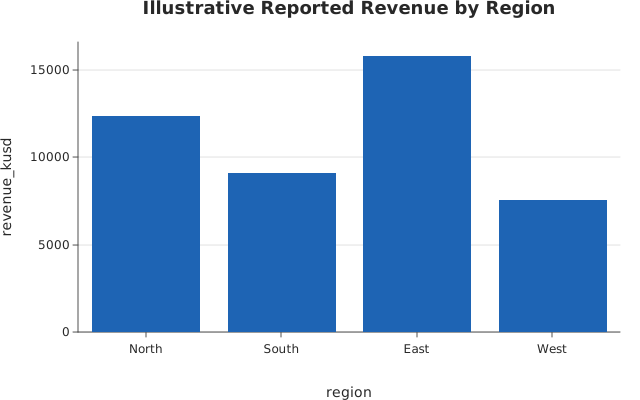
Use this when: You need to plot a dataframe_mojo DataFrame by column name, letting the columns carry their own axis titles.
Usage
from dataframe import Column, DataFrame, Series, col

from dataviz import bar, save


def main() raises:
    # Illustrative quarterly revenue by region, with one region under
    # review and excluded downstream.
    var sales = DataFrame(
        [
            Series(
                "region",
                Column[String](
                    ["North", "South", "East", "West", "Unassigned"]
                ),
            ),
            Series(
                "revenue_musd",
                Column[Float64]([12.4, 9.1, 15.8, 7.6, 0.4]),
            ),
            Series("review", Column[Bool]([False, False, False, False, True])),
        ]
    )

    # The dataframe does the data work; the chart reads what comes out.
    var reported = sales.filter(col("review") == False).with_columns(
        (col("revenue_musd") * 1000.0).alias("revenue_kusd")
    )

    var path = "docs/src/examples/out_dataframe_columns.svg"
    var chart = bar(
        reported,
        x="region",
        y="revenue_kusd",
        title="Illustrative Reported Revenue by Region",
        width=640,
        height=400,
    )
    save(chart, path)

    # The claims: the axes are titled by the columns, the excluded row is
    # gone, and every remaining region is drawn.
    var f = open(path, "r")
    var svg = f.read()
    f.close()

    if ">region</text>" not in svg:
        raise Error("the x axis is not titled by its column")
    if ">revenue_kusd</text>" not in svg:
        raise Error("the y axis is not titled by its column")
    if "Unassigned" in svg:
        raise Error("a row the dataframe filtered out reached the chart")
    for name in ["North", "South", "East", "West"]:
        if ">" + name + "</text>" not in svg:
            raise Error("a reported region is missing from the chart: " + name)

    print(
        "dataframe columns:", len(reported.columns()), "columns drawn by name"
    )
Related
Related recipes: Plot a Long-Form DataFrame
Relevant API: Data shapes