Workflow: A Scatter with Marginals
Workflow: A Scatter with Marginals
Use this when: You need to show two variables’ relationship and each one’s own distribution in one figure, with the marginal histograms lined up on the scatter’s axes.
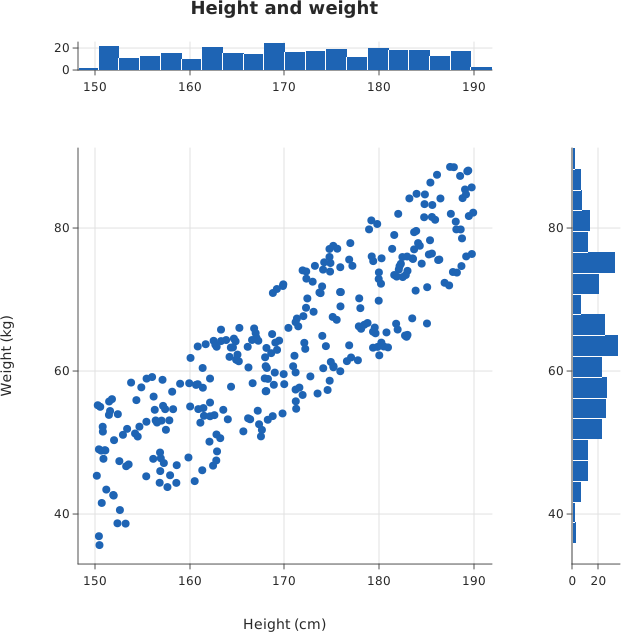
Usage
from dataviz import jointplot, save


def main() raises:
    # A correlated pair from a fixed linear congruential sequence.
    var height_cm = List[Float64]()
    var weight_kg = List[Float64]()
    var s = 20260919
    for _ in range(300):
        s = (s * 1103515245 + 12345) % 2147483648
        var h = 150.0 + Float64(s % 4000) / 100.0
        s = (s * 1103515245 + 12345) % 2147483648
        var noise = Float64(s % 2000) / 100.0 - 10.0
        height_cm.append(h)
        weight_kg.append(0.9 * (h - 100.0) + noise)

    var path = "docs/src/examples/out_workflow_scatter_marginals.svg"
    var figure = jointplot(
        height_cm,
        weight_kg,
        title="Height and weight",
        x_title="Height (cm)",
        y_title="Weight (kg)",
    )
    save(figure, path)

    # Read the x tick labels back: middle-anchored text, one row per
    # panel. The top marginal's row is the highest, the scatter's the
    # lowest; a label in both must sit at the same x.
    var f = open(path, "r")
    var svg = f.read()
    f.close()
    var xs = List[Float64]()
    var ys = List[Float64]()
    var texts = List[String]()
    var at = 0
    while True:
        var open_at = svg.find("<text ", at)
        if open_at < 0:
            break
        var tag_end = svg.find(">", open_at)
        var tag = String(svg[byte=open_at:tag_end])
        var close_at = svg.find("</text>", tag_end)
        at = close_at
        if 'text-anchor="middle"' not in tag or "rotate(" in tag:
            continue
        var x0 = tag.find('x="') + 3
        var y0 = tag.find('y="') + 3
        xs.append(Float64(String(tag[byte = x0 : tag.find('"', x0)])))
        ys.append(Float64(String(tag[byte = y0 : tag.find('"', y0)])))
        texts.append(String(svg[byte = tag_end + 1 : close_at]))
    var top_row = 1.0e9
    var bottom_row = -1.0e9
    for i in range(len(ys)):
        var numeric = True
        for b in texts[i].as_bytes():
            # Digits, a decimal point or a minus sign.
            if not ((b >= 48 and b <= 57) or b == 46 or b == 45):
                numeric = False
        if not numeric or texts[i].byte_length() == 0:
            continue
        top_row = min(top_row, ys[i])
        bottom_row = max(bottom_row, ys[i])
    if not (top_row < bottom_row):
        raise Error(
            "expected x tick labels under both the marginal and the scatter"
        )
    var matched = 0
    for i in range(len(ys)):
        if ys[i] != top_row:
            continue
        for j in range(len(ys)):
            if ys[j] == bottom_row and texts[j] == texts[i]:
                matched += 1
                if abs(xs[i] - xs[j]) > 0.5:
                    raise Error(
                        "tick "
                        + texts[i]
                        + " is at x="
                        + String(xs[i])
                        + " above but x="
                        + String(xs[j])
                        + " below: the marginal is not aligned"
                    )
    if matched == 0:
        raise Error(
            "found no tick label shared by the marginal and the scatter"
        )
Related
Related recipes: Workflow: Comparing Distributions · Workflow: A Publication Figure
Relevant API: Data shapes