Black-and-White Multi-Series
Black-and-White Multi-Series
Use this when: You need to distinguish a scatter’s series by point shape instead of color.
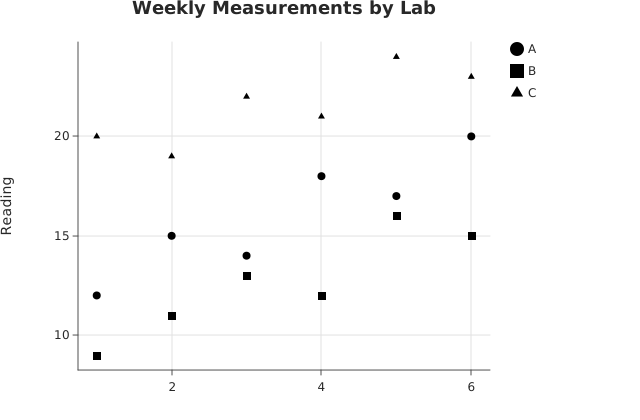
Usage
from canvas.color import Color
from dataviz import Plot, save
from dataviz.core.colors import BLACK
from dataviz.core.theme import Theme


def main() raises:
    var x: List[Float64] = [
        1.0,
        2.0,
        3.0,
        4.0,
        5.0,
        6.0,
        1.0,
        2.0,
        3.0,
        4.0,
        5.0,
        6.0,
        1.0,
        2.0,
        3.0,
        4.0,
        5.0,
        6.0,
    ]
    var y: List[Float64] = [
        12.0,
        15.0,
        14.0,
        18.0,
        17.0,
        20.0,
        9.0,
        11.0,
        13.0,
        12.0,
        16.0,
        15.0,
        20.0,
        19.0,
        22.0,
        21.0,
        24.0,
        23.0,
    ]
    var lab: List[String] = [
        "A",
        "A",
        "A",
        "A",
        "A",
        "A",
        "B",
        "B",
        "B",
        "B",
        "B",
        "B",
        "C",
        "C",
        "C",
        "C",
        "C",
        "C",
    ]
    # Every category pinned to the same flat black -- color_categories
    # is still what shape_by_category indexes into (see that field's
    # own docstring for why it's a no-op without a category column),
    # but a real black-and-white chart wants every point actually
    # black, not each category's usual palette color.
    var mono: Dict[String, Color] = {"A": BLACK, "B": BLACK, "C": BLACK}

    var plot = (
        Plot()
        .mark_point()
        .encode(x=x, y=y, color_categories=lab, color_map=mono)
        .labels(title="Weekly Measurements by Lab", y_title="Reading")
        .theme(Theme(shape_by_category=True))
    )
    save(plot, "docs/src/examples/out_shape_by_category.svg")
Related
Related recipes: One Color Per Category Across Two Charts · High-Contrast Theme