Facet a DataFrame by a Column
Facet a DataFrame by a Column
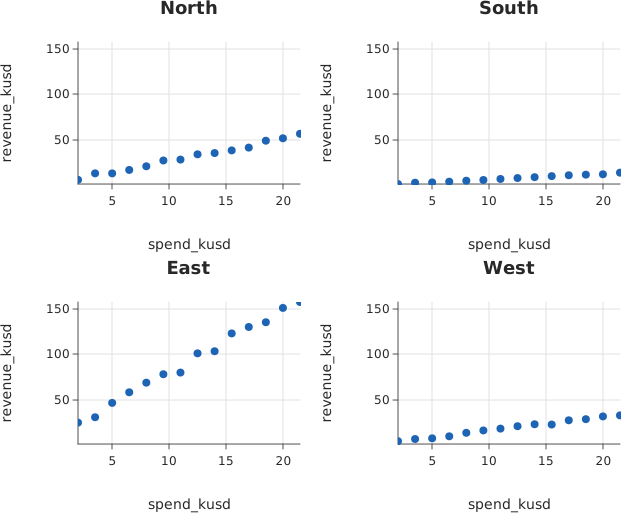
Use this when: You need to draw one panel per level of a column, on axes that make the panels comparable.
Usage
from dataframe import Column, DataFrame, Series, col

from dataviz.chart import AnyChart
from dataviz import Plot, facet_by, pooled_extent, scatter
from dataviz.facets import save_facets


def main() raises:
    # Illustrative campaign spend against revenue, four regions of very
    # different size -- which is exactly when a shared axis matters.
    var region = List[String]()
    var spend = List[Float64]()
    var revenue = List[Float64]()
    var names: List[String] = ["North", "South", "East", "West"]
    var scale: List[Float64] = [1.0, 0.25, 3.0, 0.6]
    var seed = 20260921
    for r in range(len(names)):
        for i in range(14):
            seed = (seed * 1103515245 + 12345) % 2147483648
            var wobble = Float64(seed % 500) / 100.0
            var s = 2.0 + Float64(i) * 1.5
            region.append(names[r])
            spend.append(s)
            revenue.append((s * 2.4 + wobble) * scale[r])

    var campaigns = DataFrame(
        [
            Series("region", Column[String](region.copy())),
            Series("spend_kusd", Column[Float64](spend.copy())),
            Series("revenue_kusd", Column[Float64](revenue.copy())),
        ]
    )

    # Measure once, over every row, before splitting.
    var y = pooled_extent(campaigns, "revenue_kusd")
    var x = pooled_extent(campaigns, "spend_kusd")

    var panels = List[AnyChart]()
    for part in facet_by(campaigns.filter(col("spend_kusd") > 0.0), "region"):
        panels.append(
            AnyChart(
                scatter(
                    part.frame,
                    x="spend_kusd",
                    y="revenue_kusd",
                    title=part.name,
                    width=320,
                    height=260,
                )
                .scale_x_domain(x[0], x[1])
                .scale_y_domain(y[0], y[1])
            )
        )

    var path = "docs/src/examples/out_dataframe_facets.svg"
    save_facets(panels, 2, path)

    var f = open(path, "r")
    var svg = f.read()
    f.close()

    for name in names:
        if ">" + name + "</text>" not in svg:
            raise Error("a region has no panel: " + name)

    # Every panel carries the same y ticks, which is what a shared axis
    # means to a reader comparing them. Without it, the small regions
    # would each end at their own maximum and look like the large one.
    var top_tick = String("")
    var at = 0
    var best = -1.0
    while True:
        var i = svg.find(">", at)
        if i < 0:
            break
        var j = svg.find("</text>", i)
        if j < 0:
            break
        var text = String(svg[byte = i + 1 : j])
        at = j + 7
        try:
            var v = Float64(text)
            if v > best:
                best = v
                top_tick = text
        except:
            continue
    if top_tick.byte_length() == 0:
        raise Error("no numeric tick labels found at all")
    var appearances = 0
    at = 0
    while True:
        var i = svg.find(">" + top_tick + "</text>", at)
        if i < 0:
            break
        appearances += 1
        at = i + 1
    if appearances < len(panels):
        raise Error(
            "the highest y tick appears in only "
            + String(appearances)
            + " panels, so they do not share an axis"
        )

    print(
        "facets:",
        len(panels),
        "panels, shared y up to",
        y[1],
        "from",
        campaigns.height(),
        "rows",
    )
Related
Related recipes: Plot a Long-Form DataFrame · Grouped DataFrame Facets
Relevant API: Data shapes